Getting your products into ChatGPT with a product feed
A ChatGPT product feed is your catalogue in OpenAI's format, as a JSONL, CSV or TSV file with 11 required fields on every row. As of November 2026 the organic merchant feed reaches US shoppers only, while ChatGPT ads, which take a product feed too, are self-serve in 89 countries including the UK and 31 European markets.
Last verified 21 November 2026. An eight minute read.
What ChatGPT shows a shopper
Ask ChatGPT which robot vacuum to buy for pet hair and it answers with picks: a picture, a price, a seller and a few lines on why. OpenAI says those results aren't ads1. It picks them from structured product data, reviews and the shopper's own context, and ranks the sellers on availability, price, quality and whether they make it or are its main seller1.
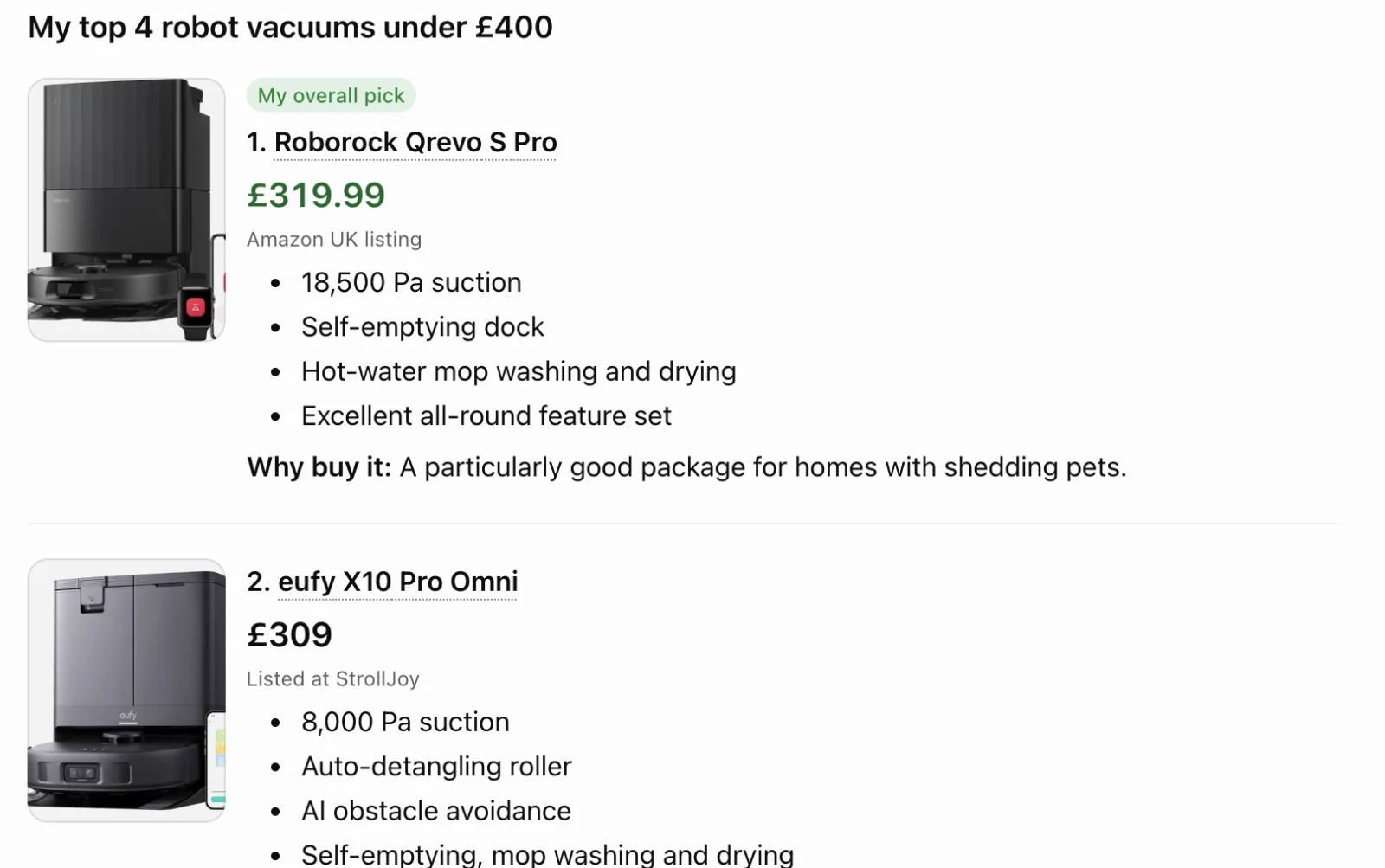
Suction power, a self-emptying dock, an anti-tangle roller. Those are product attributes, and ChatGPT shows the ones it could find. Your product feed is how you hand them over yourself; without one, ChatGPT leans on whatever other providers and third-party sites supply1.
On 24 March 2026 OpenAI dropped the first version of Instant Checkout and moved its effort to discovery: browsing by picture, side-by-side comparison and fresher product data2. The sale now finishes on your own site or app, and OpenAI charges no fee on a sale that starts in ChatGPT3. So the feed's whole job is to get you into the answer and send the shopper to the right page.
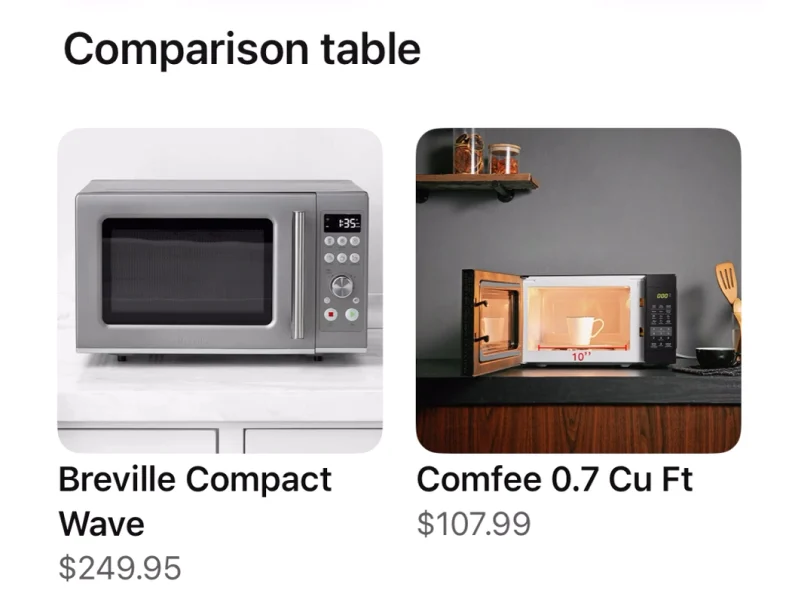
Do you need your own feed?
If you sell on Shopify or Etsy, your products already reach ChatGPT. Shopify sends them through Shopify Catalog to what it calls agentic storefronts, on by default for eligible stores10, and OpenAI's merchant page says Etsy catalogues are already integrated3. That gets you listed. It doesn't get you chosen.
The connector sends your store's data as it sits, the same way it sends every other store on the platform. A jacket called "The Hudson" goes over as "The Hudson". The facts a shopper asks about, waterproof, packable, 3-layer, men's, usually live in your description, your tags or the collection the product sits in, and the connector doesn't lift them into their own fields.
ChatGPT can only match on what it can read, so the store that has split those facts out wins the "waterproof men's jacket under £200" question.
| You sell on | Route in | What it leaves undone |
|---|---|---|
| Shopify | Shopify Catalog, on by default10 | Attributes buried in descriptions, tags and collections; titles written for your store |
| Etsy | Integrated by OpenAI3 | The same, plus little control over what's sent |
| Salesforce Commerce Cloud or Stripe | Named by OpenAI as ways in2 | Ask your provider which fields it maps |
| WooCommerce, Magento, BigCommerce, custom | Your own feed | Everything, which also means full control |
And what ChatGPT wants isn't what Google or Meta wants.
Field names differ, values differ (pre_order, not preorder), and so does what's worth filling first.
One feed per channel, built from the same catalogue, is the realistic answer.
Every route into every assistant is in how products get into AI assistants.
How to get access
OpenAI tells this story two ways, and as of 21 November 2026 they still don't match.
The developer docs describe self-serve onboarding in Business Hub4:
- Claim your business. If you already run ChatGPT ads or have an OpenAI account manager, your workspace admin should have a claim link.
- Verify your identity in the product section. Uploads stay locked until you do.
- Choose your countries and currencies.
- Pick one delivery method: manual upload, a hosted HTTPS URL or SFTP.
- Upload, read the errors, fix them.
The merchant page still has an application form, tells earlier applicants they're on the waitlist, and promises self-serve "later this year"3. Try Business Hub first. If you can't reach the product section, fill in the form as well, and don't wait on either before building the file.
The 11 fields every row needs
One row per variant you sell. Nine fields describe the product and two say where you sell it5.
| Field | Required | What goes in it |
|---|---|---|
item_id |
Required | A stable ID per variant, never reused |
title |
Required | Name plus the variant, ideally under 150 characters |
description |
Required | Plain text, no HTML, ideally under 5,000 characters |
url |
Required | The product page, with the variant selected where possible |
brand |
Required | As shown on the product page |
seller_name |
Required | The business selling it |
image_url |
Required | A direct link to a JPEG or PNG |
availability |
Required | in_stock, out_of_stock, pre_order, backorder or unknown |
price |
Required | Amount and code, such as 79.99 USD |
target_countries |
Required | Uppercase codes, such as ["US"] |
store_country |
Required | Your store's country, such as US |
color, size, material, gender, age_group, product_category |
Optional | Fill these next |
gtin, mpn, star_rating, review_count, return_policy |
Optional | Fill these too |
The optional rows are where you get chosen. They're what lets a product match "waterproof, under 200 dollars, comes in navy".
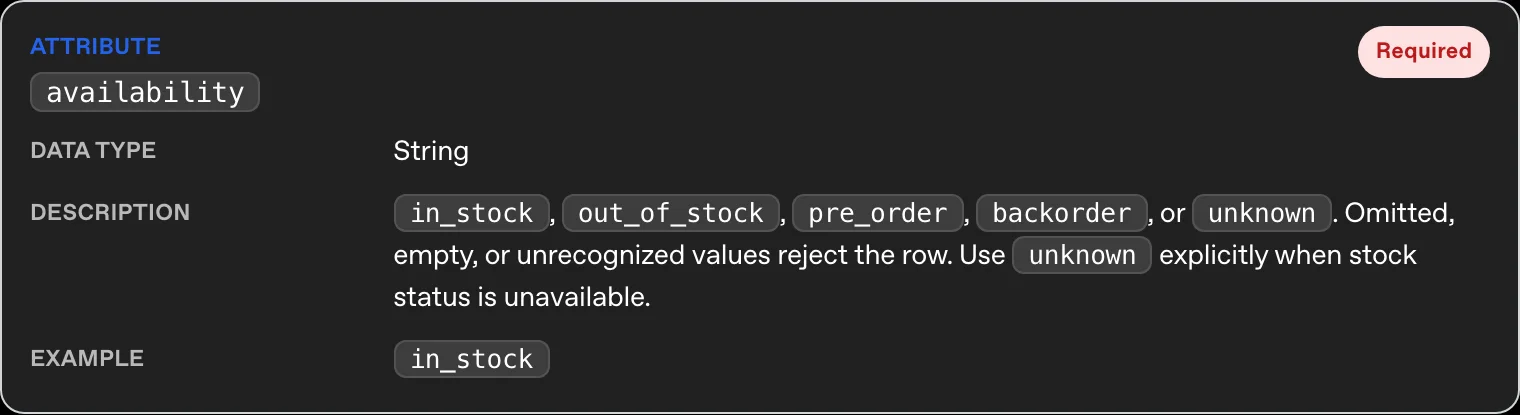
availability is the one field OpenAI says rejects the whole row when it's missing or wrong5.
It also warns that passing upload doesn't mean every bad value was caught5.
Placeholders count as bad values: leave an optional field empty instead of typing n/a or null5.
Variants need three more fields
group_id ties the variants together, listing_has_variations is true on each row, and variant_dict names what differs5.
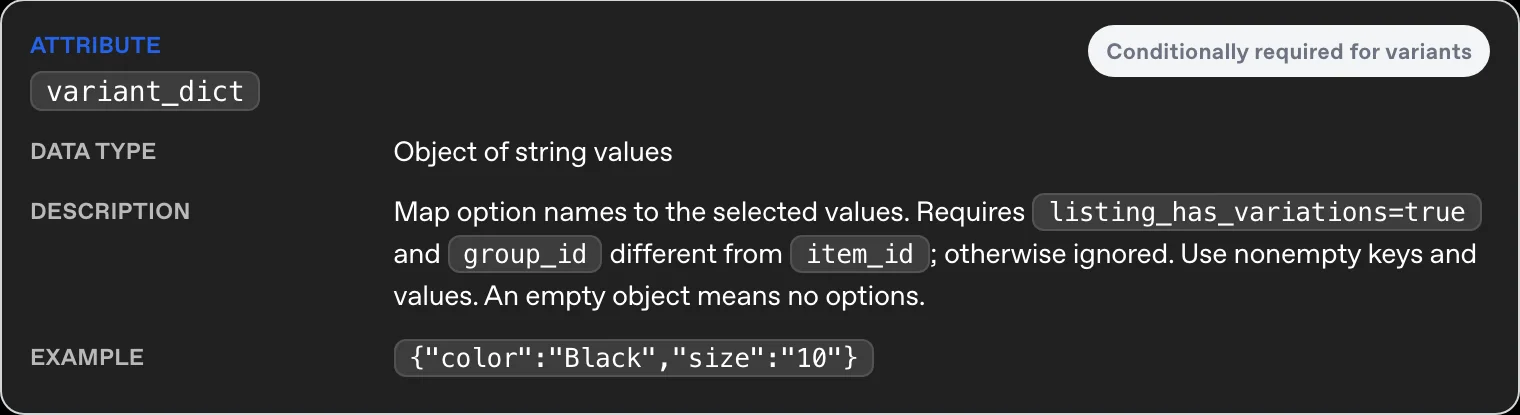
Check the url while you're here.
OpenAI recommends a link that opens with the variant already selected, where your site allows it5.
We'd treat that as a must.
A link that lands on black size M, when the row says navy size L, shows the shopper the wrong price and the wrong picture at the moment they came to buy.
Turning a Google feed into a ChatGPT feed
Most of a Merchant Center feed carries over. These are the changes58:
| ChatGPT | Change | |
|---|---|---|
id |
item_id |
Keep the same value so the product keeps its identity |
link |
url |
Rename |
image_link |
image_url |
Rename |
availability |
availability |
preorder becomes pre_order |
item_group_id |
group_id |
Add listing_has_variations and variant_dict |
google_product_category, product_type |
product_category |
A readable path split by > |
| not on a Google row | seller_name, target_countries, store_country |
Add to every row; Google sets these per account |
Strip HTML out of descriptions.
Keep prices in the 79.99 USD form, with no currency symbol and no thousands separator5.
Where ChatGPT shopping and ads are open
We checked OpenAI's own pages and a live query on 21 November 2026, because the pages disagree and secondary coverage moves weekly.
| Where, as of 21 November 2026 | Source | |
|---|---|---|
| Organic shopping results from your merchant feed | US only | Merchant page3; spec5 |
| Product picks in answers, from other sources | Seen in the UK (our live query above, priced in pounds) | Live query |
| ChatGPT ads, self-serve in Ads Manager | 89 countries, including the UK, Ireland and the 31 European markets | Ads Manager availability11; OpenAI612 |
| Product feed campaigns in Ads Manager | OpenAI doesn't list the countries; check Ads Manager for yours | Help Center7 |
So yes, a UK or EU business can open an ads account and run ads today; whether a product feed campaign serves in your market is something to confirm in Ads Manager. OpenAI's Ads Manager availability table lists the UK, Germany, France, Ireland and the rest of Europe as available, and the advertiser's legal entity has to be in a listed country11.
Self-serve opened across the 31 European markets on 31 August 202612. OpenAI's feed campaign article names no country it excludes, and targeting there is by country7.
The organic feed is the part that's still US only.
The spec says standard uploads target the US whatever target_countries says, and other markets need OpenAI to confirm your integration5.
Until it does, send ["US"] and price in USD.
Every other programme by country is in AI shopping by country.
ChatGPT ads run on the same file
Ads are a separate, paid placement, labelled as ads. A product feed campaign uses the spec above, loaded in Ads Manager under Tools, then Feeds, and OpenAI's help article sets the rules7:
- Upload a CSV or TXT file, or connect a hosted URL or SFTP.
- Items expire after 2 weeks, so a one-off upload goes dark. Use a URL or a scheduled SFTP drop.
- Every product in an Ads Manager feed can run as an ad unless you mark it not eligible.
- Your own labels go in
ads_metadata, and ad groups filter on them. Targeting is by country and nothing finer. - While ads are in beta, products from this feed stay out of organic answers.
Ad accounts with access can also push price, title and stock changes through the Delta Feeds API between full uploads9. The full ads setup is in ChatGPT ads and your product feed.
If your catalogue is thin on attributes
Most catalogues we take on have the facts ChatGPT wants, written down somewhere other than a field. Colour in the title, material in the description, "kids" in a collection name. FeedWorks pulls those out into the fields each channel reads, as rules that keep working on every new product you import, and builds the ChatGPT feed from the same catalogue as your Google and Meta feeds, each in its own format.
Aurora, the agent inside FeedWorks, drafts the rules and, by default, you approve them, previewed on the whole catalogue first. A sportswear retailer we work with had thousands of products missing the attributes Google and the assistants read; Aurora drafted the rules, someone on their team said yes, and more than 8,000 fields were filled in one action.
It fills the optional fields as well as the required ones, which raises the odds a product matches a specific question. OpenAI still decides what gets shown.