Running a product feed for ChatGPT ads
A ChatGPT ads product feed is your catalogue in OpenAI's feed format, loaded in Ads Manager under Tools, then Feeds, and it needs refreshing because every item expires after 2 weeks. As of November 2026 ChatGPT ads run in 89 countries, including the UK and 31 European markets, products from the ads feed appear only in ads, and campaigns target by country and nothing finer.
Last verified 21 November 2026. A seven minute read.
How the ads feed differs from the shopping feed
Same format, different door. An ads feed uses OpenAI's product feed spec, the one that drives ChatGPT's organic shopping results, plus two fields that only ads read4. You load it in Ads Manager, not Business Hub, and it does a different job, as OpenAI's help article on product feed campaigns sets out16.
| Organic shopping feed | Ads feed | |
|---|---|---|
| Where it goes | Business Hub6 | Ads Manager, under Tools, then Feeds1 |
| What it buys | A chance at the unpaid answer | Paid product cards and carousels1, labelled as ads7 |
| Shows in organic answers | Yes | No, during the beta1 |
| How long an item lasts | OpenAI doesn't say | 2 weeks, then it expires1 |
| Extra fields | None | is_ads_eligible, ads_metadata4 |
The third row is the one people miss. As of 21 November 2026, OpenAI's help centre says ads feed products don't appear in organic conversations during the beta, though that may change1. If you want both, submit the same catalogue twice, once in each place.
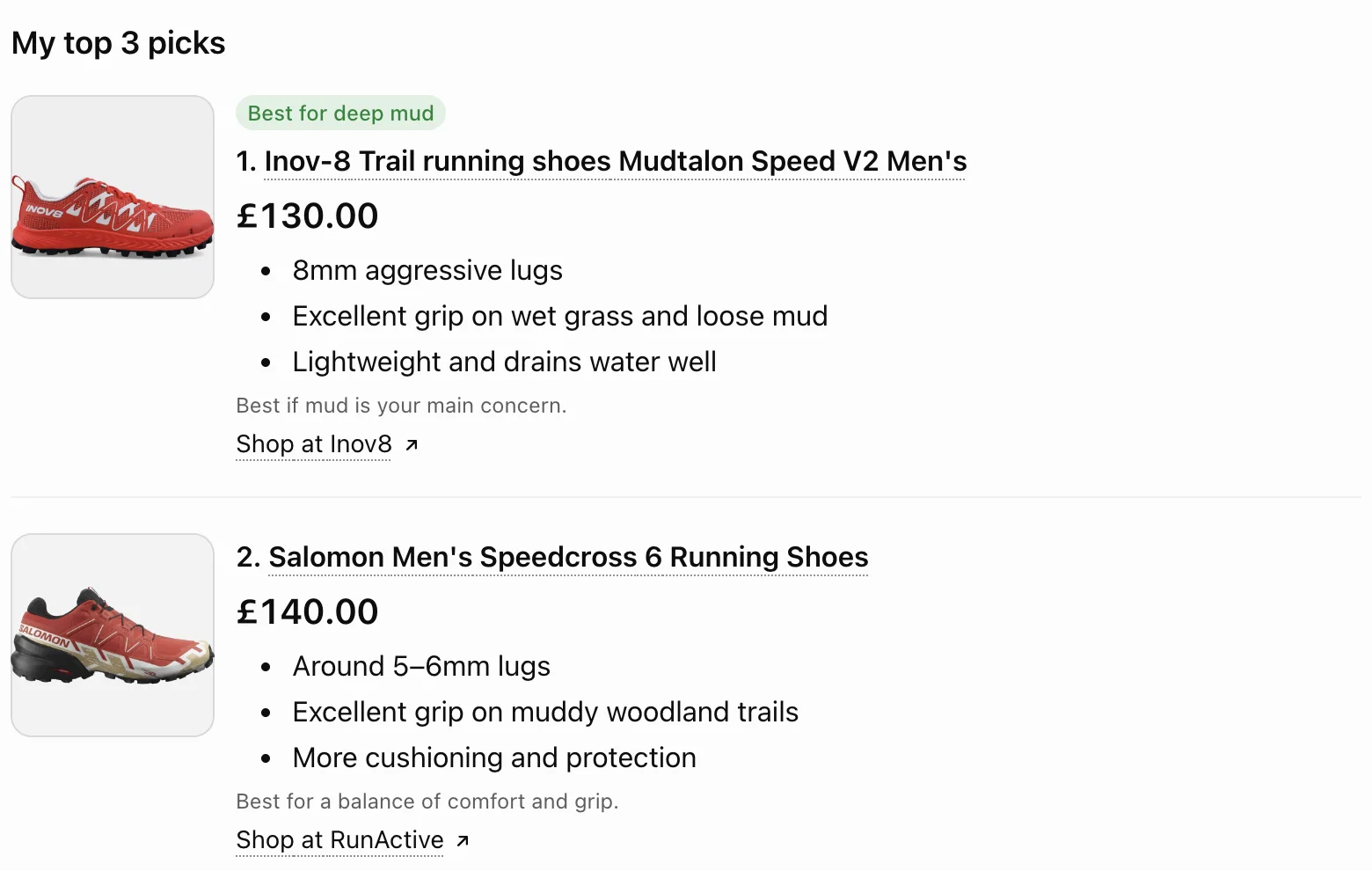
Shopify and Etsy stores are in the organic results already, with no application8. That route sends the store's data as it sits, the same as every other store on the platform, and it doesn't create an ads feed. Its titles stay as they were written for the store, and on a ChatGPT ad the title is the headline.
The 11 fields every row needs, and how to get into organic results, are in the ChatGPT product feed guide. This page is for the person running the ad account.
Where the feed lives in Ads Manager
Open the Tools tab, choose Feeds, then Create Feed1. From the three-dot menu on the feed's row you pick how the file arrives1:
- Upload a CSV or TXT file. Fine for a first test.
- A hosted URL: your catalogue at a stable HTTPS address.
- SFTP, for a server that pushes the file on a schedule.
Processing takes from a few minutes to a few hours, depending on size1.
Then create a campaign with Product feed as the type, and give each ad group the feed and a filter1. The ad template lets you pick the image and nothing else; OpenAI chooses a single card or a carousel, and the title, price, sale price, brand and star rating all come from your rows1.
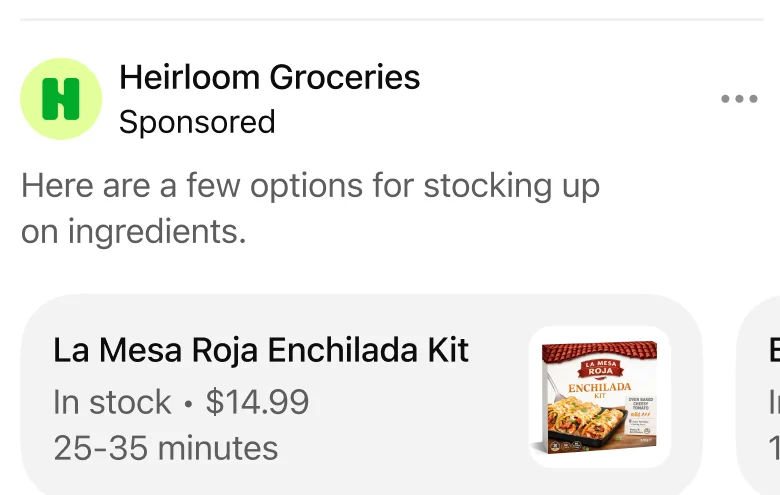
So your title is the headline, and you can't rewrite it in the ad. A title that's only a style name, "The Hudson", tells a shopper nothing. We rebuild those into brand, product type, gender, colour, size and material, and on a ChatGPT ad it's most of what the shopper reads.
Why a one-off upload goes dark
Items expire after 2 weeks1. Upload a file once, forget it, and by week three the campaign has nothing to show.
Use a hosted URL or a scheduled SFTP drop, and keep manual uploads for the first test. If your Google feed rebuilds nightly, point at a file that rebuilds with it.
Accounts that manage feeds through OpenAI's ads API can also switch on full refresh. Then any product missing from a full upload is deleted within a day, and switching it off again doesn't bring those products back2. Turn it on only if every upload is the whole catalogue. A file split by category, uploaded one part at a time, will delete the rest.
Set is_ads_eligible on every row
OpenAI's two documents disagree on what an empty value means. The help centre says feeds created in Ads Manager make every product eligible unless you mark it false1. The spec says an empty value means disabled, unless a feed-level ads default applies4. Both can be true, since an Ads Manager feed probably carries that default, but don't build a campaign on "probably".
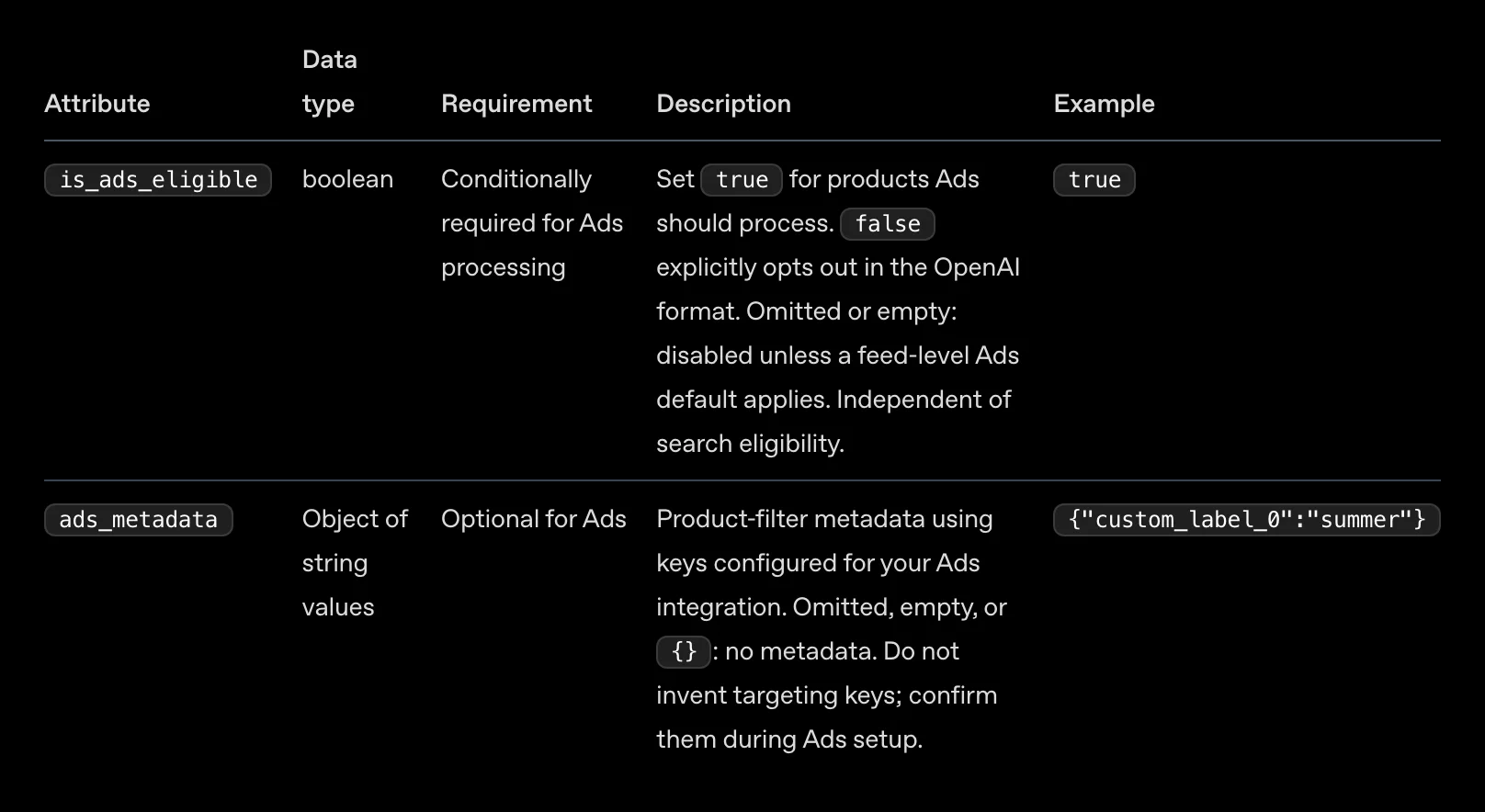
Write true or false on every row.
Mark false on anything you'd rather not pay to promote: low-margin lines, products about to be discontinued, items you can't restock.
The flag is separate from search eligibility4, so it changes nothing about organic results.
Labels in ads_metadata, and how ad groups use them
An ad group selects products with filters on brand, category, price and item ID2.
When those aren't enough, you add your own labels inside each product's ads_metadata, such as {"custom_label_0":"summer"}, and filter on them24.
- The keys have to be set up for your account. The spec says not to invent targeting keys and to confirm them during ads setup4.
- Labels pick products, not people. OpenAI's own example filters on a label of
WA, and it doesn't limit the ad to shoppers in Washington1. Location is a campaign setting. - A filter update replaces the whole list. Send every filter you want to keep2.
If you run Shopping campaigns, you have labels already.
Copy them into ads_metadata and split ChatGPT ad groups the way you split Google ones.
Check the count of matching products in Ads Manager before you launch1.
Can you run ChatGPT ads in the UK and Europe?
Yes, as of 21 November 2026. ChatGPT ads run in 89 countries, shown to Free and Go users only, according to OpenAI's 21 October announcement5. OpenAI's availability list has the UK, the US and most of Europe open for self-service in Ads Manager, for advertisers whose legal entity is based there9. Self-service opened across 31 European markets on 31 August 202610.
| Market | Self-service in Ads Manager | Product feed campaigns |
|---|---|---|
| United States | Yes9 | Yes1 |
| United Kingdom | Yes9 | Not stated by OpenAI |
| 31 European markets, including Germany, France, Spain, Italy and the Netherlands | Yes, since 31 August 202610 | Not stated by OpenAI |
| Canada, Australia, New Zealand | Yes9 | Not stated by OpenAI |
The feed half is less clear. A product feed campaign targets by country and nothing finer1, and a feed is created with its own list of countries2. But the feed spec says a standard upload targets the US, the shared format covers the US, Canada and Mexico, and other markets need OpenAI to confirm the countries and currencies for your integration4.
We found no OpenAI page on 21 November 2026 that lists the countries where product feed campaigns serve.
So a UK or European advertiser can open an account and run ads today. Before you build a feed campaign around a market, create the feed in Ads Manager, see which countries it offers, and get your OpenAI contact to confirm the currency. Where every AI shopping programme is live is in AI shopping by country.
Keeping price and stock fresh with the Delta Feeds API
A full file a day is fine for most catalogues. If your prices or stock move faster than that, the Delta Feeds API changes the title, price or availability of a variant that's already in the feed, without a new upload3.
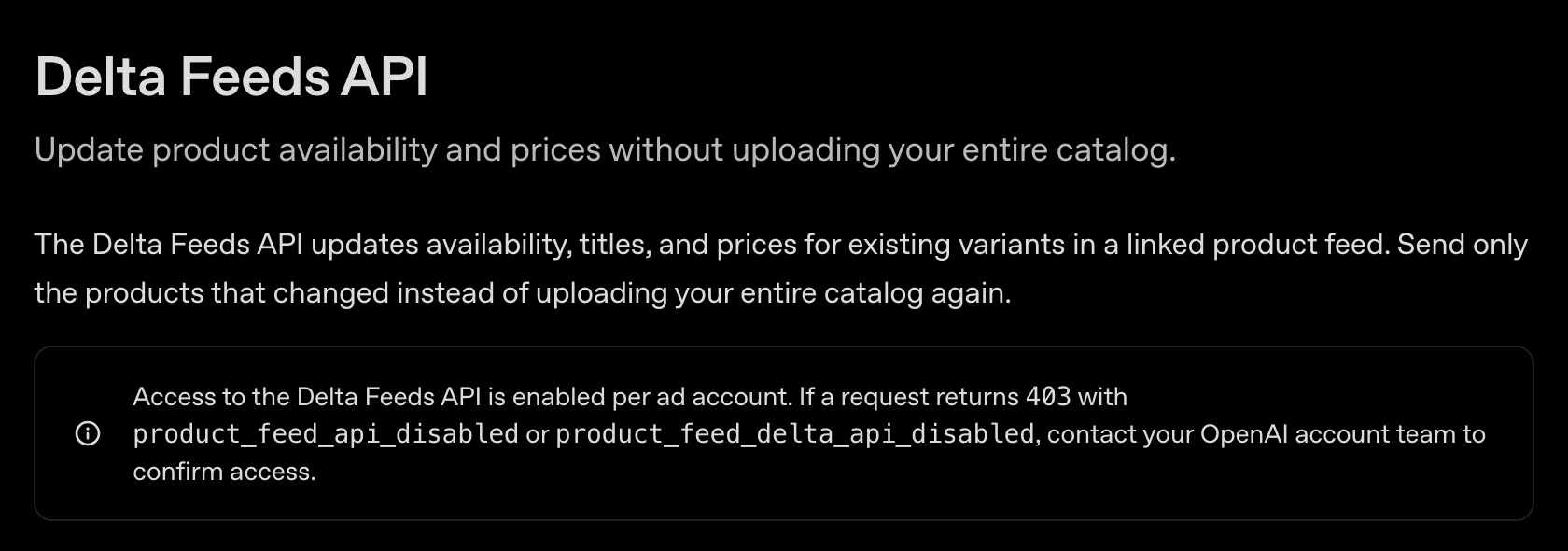
It can't add a product, create a feed or change an image or description3.
New products and other fields still need a full upload2.
A reply of accepted: true means OpenAI took the change, not that the ad has updated3.
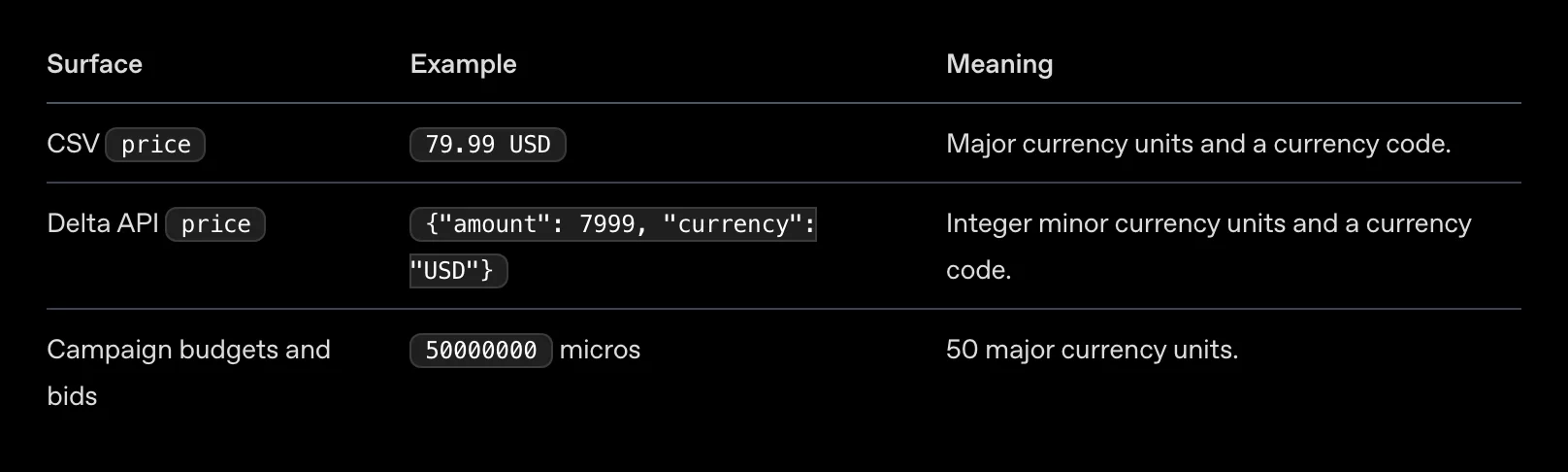
Watch the price format. The same 79.99 dollars is written three ways across OpenAI's ads products2.
Reading the upload results
A finished upload doesn't mean products will serve2. In Ads Manager, the tooltip next to Items shows Ingested, Processed, Not approved and Ready counts1. Not approved is only a number, with no list of products and no reasons1. Support can't appeal or review a single product rejected for policy, so the fix is in your catalogue1.
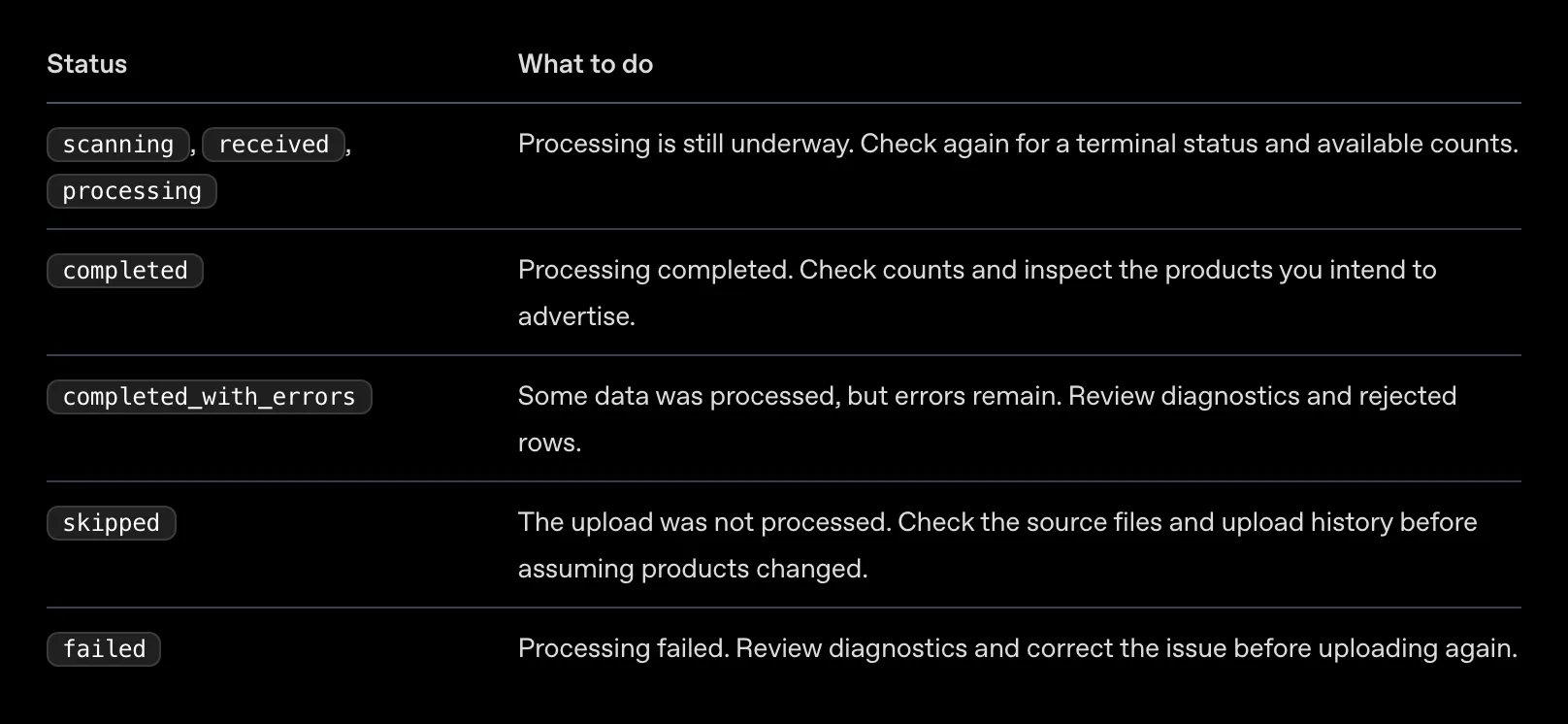
Ad accounts with API review access can list rejected products with their reasons2. If yours has it, use it. We found no other place a reason appears.
What to do this week
- Confirm in Ads Manager that product feed campaigns are offered in the countries and currencies you sell in.
- Take your ChatGPT or Google feed, add
is_ads_eligibleto every row, and setfalseon what you won't promote. - Copy your Google custom labels into
ads_metadata, after OpenAI confirms the keys. - Host the file at a stable HTTPS URL that rebuilds daily, and connect it in Ads Manager under Tools, then Feeds.
- Read the Not approved count before you launch, and fix rejected products at the source.
- If you also want organic results, submit the same catalogue in Business Hub. The ads feed won't put you there.
Keeping an ads feed fresh without a spreadsheet
An ads feed is never finished, because items expire every 2 weeks and the catalogue under it keeps changing. Done by hand, it's stale by week three.
FeedWorks builds the ChatGPT file from the same catalogue you send to Google, hosts it at a URL you connect in Ads Manager, and rebuilds it on a schedule as often as hourly. OpenAI still decides what's approved and what serves. Titles are rules: ask Aurora to put the brand, product type and colour into every title, and it drafts the rule, counts the products it changes and brings it to you to approve.