Getting your products into Google AI Mode and Gemini
Google AI Mode and the Gemini app read the feed you already send to Merchant Center, so there's no separate feed to build. What decides whether a product matches a detailed question is the optional attributes most store feeds leave empty, and the Buy button is extra: as of November 2026, UCP checkout is for select merchants accepted through an interest form.
Last verified 21 November 2026. A seven minute read.
Your Merchant Center feed is the AI Mode feed
There's no form to fill in and no new file to build. Google's free listings page lists Gemini among the places an eligible product can show1, and its guide to generative AI features in Search says Merchant Center feeds can help products show in AI answers2. The same guide says you don't need AI text files, new markup or special schema.org to appear2.
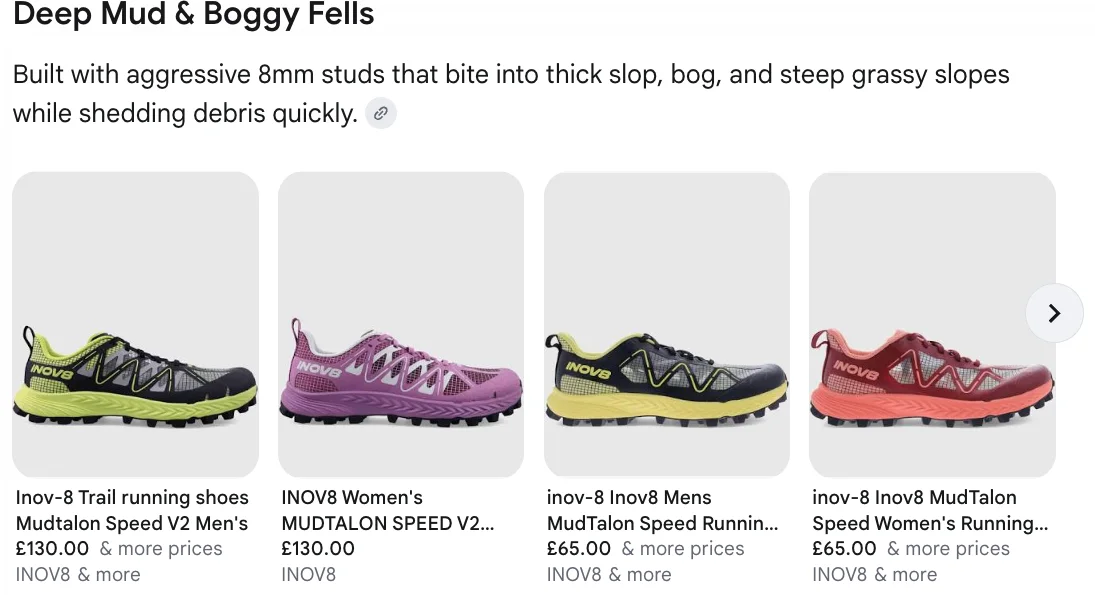
So the work is in the feed you already have. AI Mode answers "trail shoes for deep mud" with a heading about 8mm studs and boggy fells, then the products that fit it. If your feed doesn't say what the shoe is for, the answer has nothing to put you under.
A product disapproved or excluded from free listings has no way in at all, so clear those first. Every other assistant's route is in how products get into AI assistants.
Required and optional: the attributes AI Mode leans on
Google hasn't published a ranking of which fields AI Mode weighs. What it has published is the product data specification, which marks each field required or optional3. A shopper's question tells you the rest: "waterproof, under 150, in navy, for a size 8 foot" is four filters, and each one is a field.
| Attribute | Google's status | What it answers | Sent by your store? |
|---|---|---|---|
title, description, link, image_link, price, availability |
Required | What it is, what it costs, whether you can get it | Yes, as written in your store |
brand |
Required for new products | Who makes it | Usually |
gtin |
Strongly recommended | Which product this is, so reviews and other sellers line up | Only if you've entered barcodes |
item_group_id, color, size |
Required for variants and apparel in the US, UK and 4 more countries | "In navy, size M" | Usually, from variant options |
gender, age_group |
Required for apparel in the same 6 countries | "Men's", "for an 8 year old" | Often missing or defaulted |
material, pattern |
Required only when they tell variants apart | "Merino", "striped" | Rarely, it sits in the description |
product_highlight |
Optional | Short, skimmable selling points | Almost never |
product_detail |
Optional | Specs as name and value pairs | Almost never |
short_title |
Optional, used in Demand Gen | A short name, 5 to 65 characters recommended | No |
structured_title, structured_description |
Optional, for AI-written text | Declares the text as AI-generated | No |
The right-hand column is what we see when we open a feed sent straight from Shopify, WooCommerce or Magento. The required rows come through. The rows below them are the ones that answer the second and third question a shopper asks, and they're the ones left empty.
Google's own guidance is to use structured_title instead of title when the title was written by generative AI3.
The one-click route and what it leaves
Shopify's Google & YouTube app syncs your products to Merchant Center automatically15, and the other big platforms have their own connectors. Use one if you have nothing else; it gets you listed.
It sends your products as they sit in your store, the same way it sends every other store on the platform, so it gives you no edge. The merino in the description stays in the description, the "kids" in the collection name stays there, and the title is still the one you wrote for your own product page.
Conversational attributes
Google has added 6 optional conversational attributes aimed at AI surfaces such as AI Mode: question_and_answer, document_link, related_product, item_group_title, variant_option and popularity_rank4.
They don't affect approval, and Google suggests sending them as a supplemental data source4.
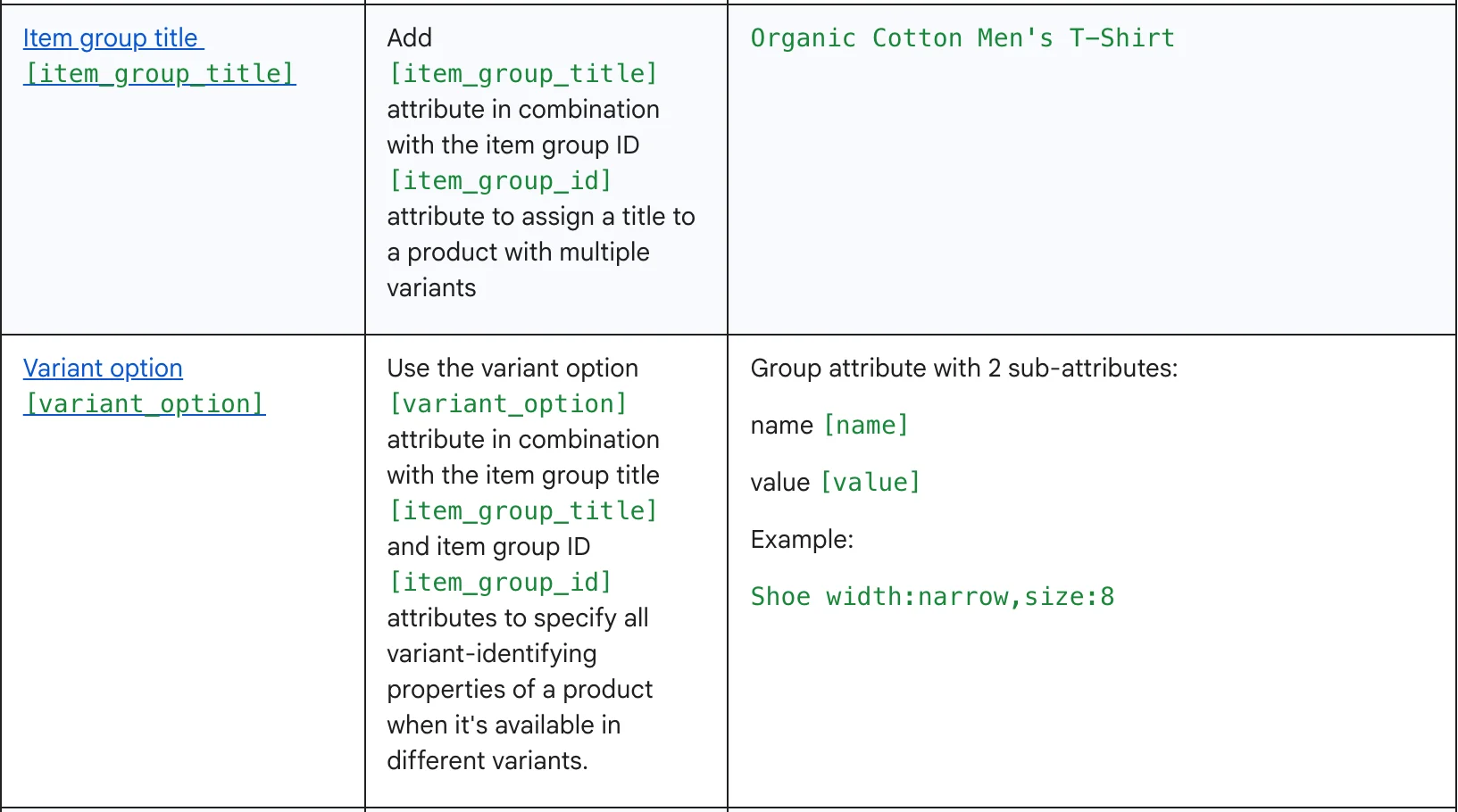
Start with item_group_title and variant_option, because checkout uses them too.
How to fill all 6 without making anything up is in Google's conversational attributes.
UCP checkout: the Buy button
Google announced the Universal Commerce Protocol (UCP), an open standard for AI agents to discover and buy products, on 11 January 2026, built with Shopify, Etsy, Wayfair, Target and Walmart5. The checkout built on it puts a Buy button on eligible listings in AI Mode and the Gemini app6. The shopper pays with Google Pay using details already in Google Wallet, and you stay the seller of record6.
The attribute, written two ways
Only listings with native_commerce set get the button6.
Google documents it twice, and as of 21 November 2026 the two pages differ.
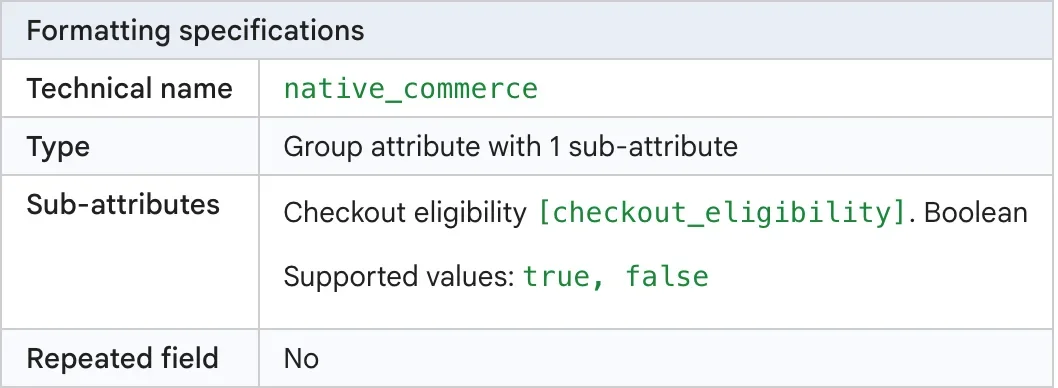
The Merchant Center help page defines a group attribute with one sub-attribute, checkout_eligibility, true or false, and the text feed header native_commerce(checkout_eligibility)7.
The UCP developer guide adds a second, cart_eligibility, for sending a cart to your own site8.
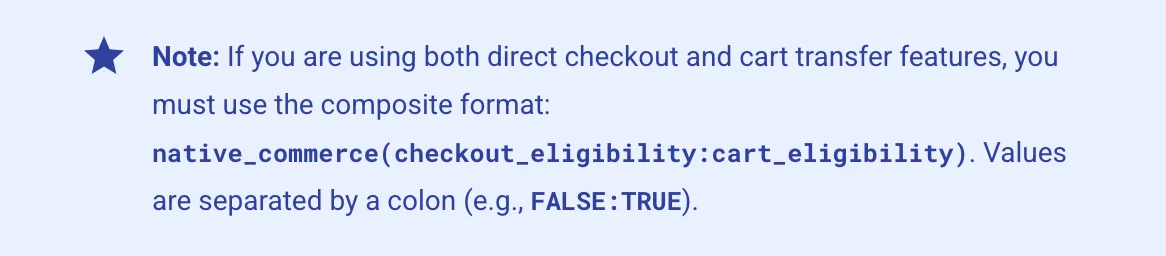
Cart transfer is opt-out there: leave cart_eligibility blank and the product is in8.
The guide also warns that the whole group is overwritten on each upload, so a flag you leave out is erased8.
If you're onboarding to UCP, follow the developer guide and send every flag on every upload.
What else Google asks for
Returns and a support contact set in Merchant Center, consumer_notice on anything with a legal warning, a Google Pay & Wallet Console account, and a list of products that must stay out, from subscriptions to pre-orders68.
The full list, and how to work through it, is in UCP checkout.
Who can use it, as of November 2026
It's for select merchants. You build the integration, submit Google's interest form, and if you're picked, an onboarding area with a sandbox appears in Merchant Center9.
On Shopify, direct checkout in AI Mode and Gemini is on by default for eligible stores, under Sales channels, Agentic, while discovery still runs through Merchant Center14. Google emailed those merchants about it in September 202611.
Google's pages don't give the same countries.
| Page | What it says |
|---|---|
| UCP checkout help page6 | Applies to products eligible in the US, Canada and Australia. |
| Onboarding help page9 | Merchant Center onboarding is in the US, with Australia and Canada in 2027. |
| UCP developer pages812 | No countries named. |
| Google Canada, 4 November 202610 | Checkout is live for Canadian shoppers with three named retailers and select Shopify merchants. |
So shoppers in three countries can see the button, while a merchant applying through Merchant Center today joins the US queue. We found no UK or EU launch on 21 November 2026, although the checkout help page links to UK terms of service6.
See how you show up: AI performance insights
Merchant Center has a report for this, under Analytics, then Products, on the AI performance tab13. It shows your share of voice in AI Mode and AI Overviews against the competitors Merchant Center already holds for your account, which you can't change from the report, grouped by shopping stage13.
It also has a popular attributes scorecard of specs shoppers look for, such as size, colour or material, that may be missing from your data13.
It covers organic traffic only, English queries only, for accounts in Australia, Canada, India, New Zealand and the US13. It doesn't mention the Gemini app.
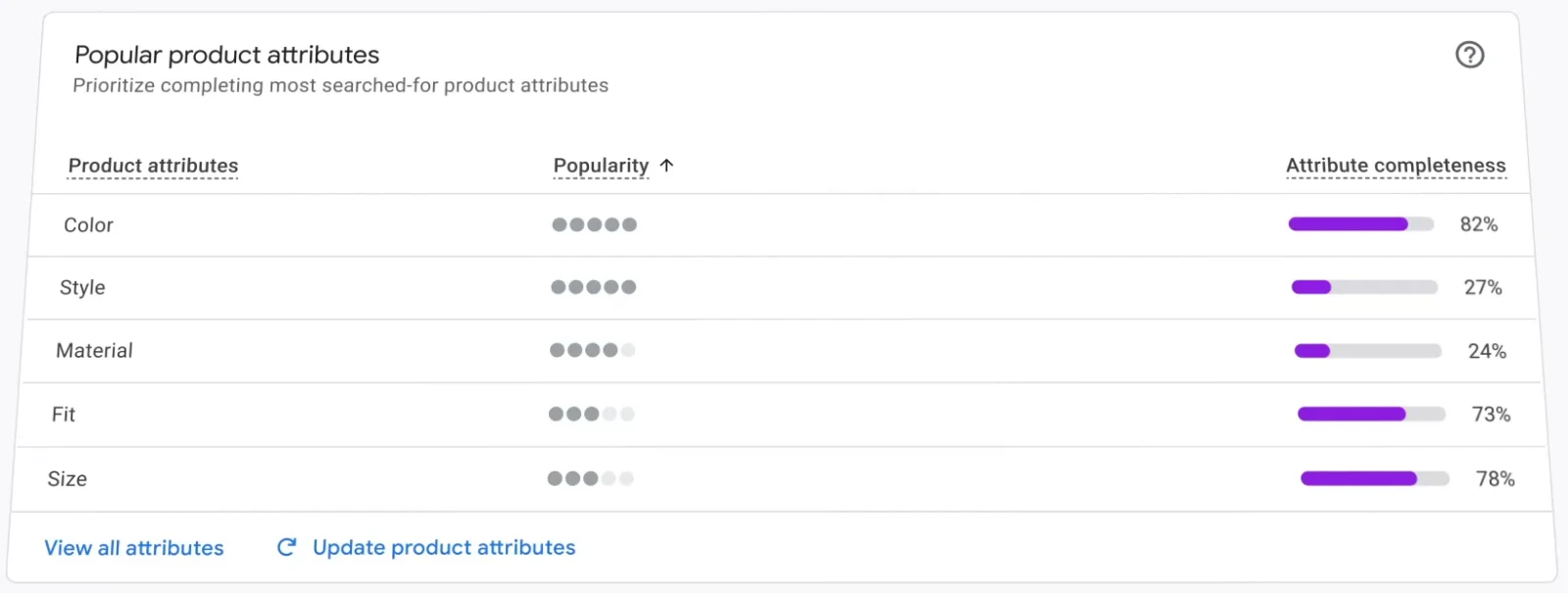
If you're in one of those countries, open it before you touch anything else, because it's Google telling you which empty fields cost you.
When your feed has the facts in the wrong places
The facts AI Mode wants are usually in your store already, in a description, a tag or a collection name.
FeedWorks moves them into color, material, pattern and gender, and the rule keeps applying to every product you add later.
It also scores each product against Google's required and recommended fields, the 6 conversational attributes included.
It sends the result to Merchant Center over a direct API connection.
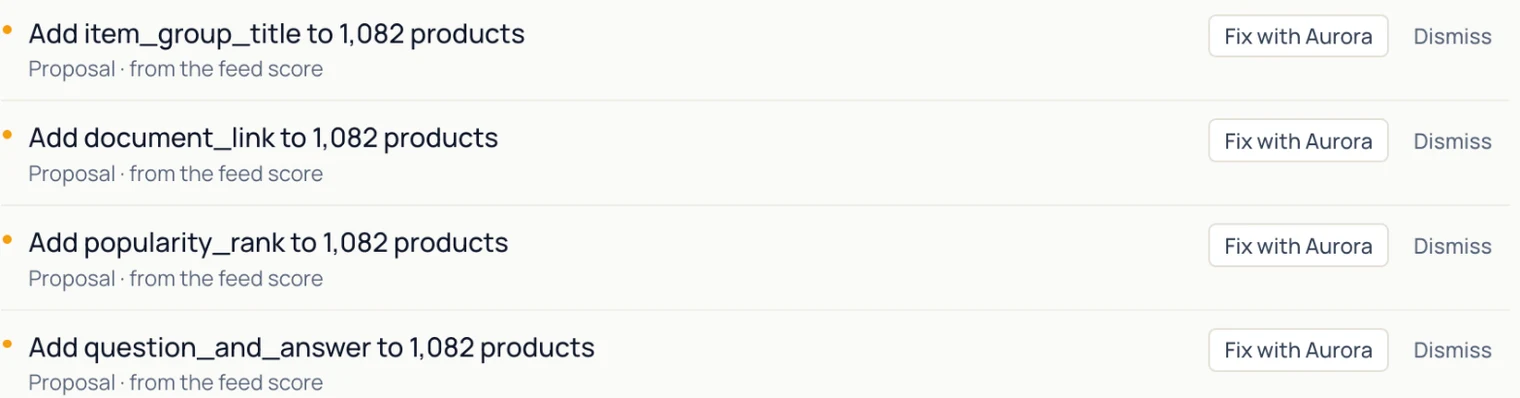
Titles get the same treatment. We worked on an apparel catalogue whose titles were bare style names, so a question about a navy merino jumper had nothing to land on; each title now leads with the brand and says what the garment is, who it's for, its colour, its size and its fabric. Aurora drafts rules like that from a sentence, previewed on the whole catalogue, and by default a person approves them.
Checkout isn't ours to give. Google picks who gets UCP; we get the feed ready for it. The full setup is in UCP checkout.