Fixing invalid and missing GTINs in Merchant Center
Google flags a GTIN that isn't 8, 12, 13 or 14 digits, has the wrong check digit, or falls in a GS1 prefix range kept for internal use or coupons. Paste yours into the checker on this page to find them, and set identifier_exists to no only for products that genuinely have none.
Last verified 21 November 2026. A six minute read.
Check your GTINs
Paste up to 100 GTINs from your feed to see which ones Google will refuse. It runs in your browser, so nothing you paste leaves your machine. Check a longer list 100 at a time on the full GTIN checker.
What Google is telling you
As of November 2026, Merchant Center has five GTIN issues, and each one wants a different fix. The one people search for most is "Limited performance due to missing value: GTIN [gtin]", which is about a number you didn't send.
| Issue in Merchant Center | What it means | The fix |
|---|---|---|
| Limited performance due to missing value: GTIN [gtin] | The category usually has GTINs and you sent none3 | Add the manufacturer's GTIN, or mark the product as having none |
| Invalid value [gtin] | Wrong length, letters, or a bad check digit4 | Correct the number |
| Restricted GTIN | In the restricted ranges, prefixes 2, 02 or 0415 | Use the manufacturer's GTIN, or leave it blank |
| Unsupported GTIN | A coupon number, prefixes 981 to 984, 99 or 056 | Same |
| Incorrect GTIN | A real GTIN, but another product's7 | Find this product's own number |
The first one is a warning, and the product keeps showing. Google says it may get less visibility and that it can't be sure of matching a product without a GTIN13. How much less, Google doesn't say, and we haven't found a number we'd trust.
The other four are about a number that's there and wrong. Google is blunter about those: wrong identifiers can get a product disapproved2. So a wrong GTIN is worse than an empty one, and Google's own advice is to leave it out if you aren't sure1.
What a GTIN is
It's the number printed under the barcode. The manufacturer assigns it, and any shop selling the same product should send the same number2.

Google's GTIN attribute page takes 4 lengths, and its Find a GTIN page says where each is used111:
| Digits | Also called | Where Google says you'll find it |
|---|---|---|
| 8 | EAN-8, JAN | Japan uses 8 or 13 |
| 12 | UPC-A | North America |
| 13 | EAN-13, JAN, ISBN-13 | Europe, Japan, and books |
| 14 | ITF-14 | Multipacks and cases |
Turn an 8-digit UPC-E into its 12-digit form, and an ISBN-10 into ISBN-13, before you send them1. Every colour and size has its own GTIN, so a T-shirt in 4 sizes has 4 of them1. The last digit is a check digit, there to catch typing mistakes.
The prefixes Google won't take
A number can pass the check digit and still be refused because of how it starts.
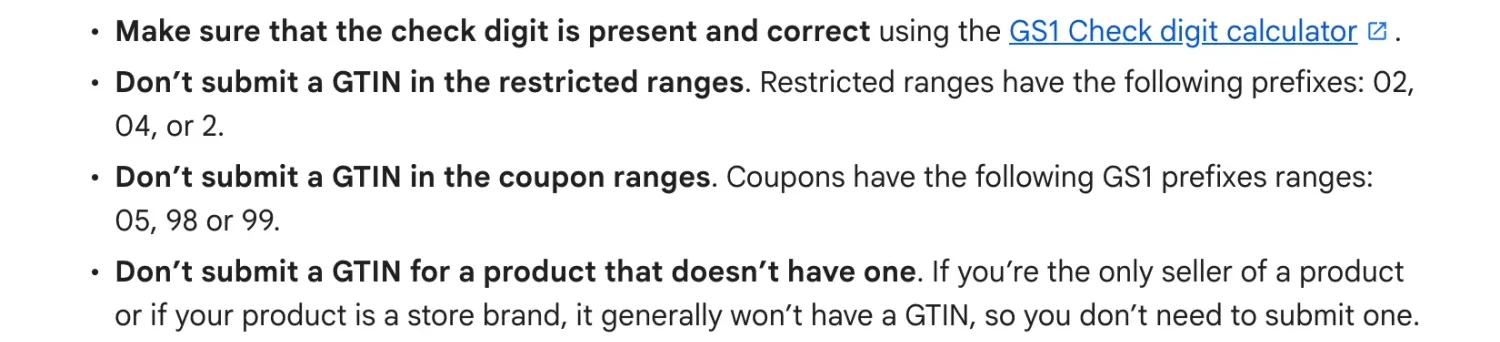
Google's own pages don't quite agree on the coupon list. The attribute page says 98, and the Unsupported GTIN page says 981 to 98416. We'd treat anything starting 98 as suspect until you've checked it.
These are GS1 prefixes, and GS1 reads them on the 13-digit form: a 12-digit UPC has an implied leading zero12. So a UPC that starts with 4 is really 04 and refused, while a UPC that starts with 04 is 004, an ordinary US number, and fine. Don't blank a UPC because of how its first two digits look; let the checker read it.
Where good GTINs go wrong
In our experience most bad GTINs were right once, and something broke them on the way to the feed.
- A spreadsheet dropped the leading zero. Open a UPC that starts with 0 in a number column and it comes back 11 digits long, which Google calls invalid.
- A spreadsheet showed it as
8.11571E+11. Save the file like that and the last digits are gone for good. Go back to the source. - Someone put the SKU in the GTIN field. Google asks you not to2.
- Every variant got the parent's GTIN. Google wants one per colour and size, and a reused GTIN is one of the causes it gives for Incorrect GTIN17.
When a product has no GTIN
Lots of products genuinely don't have one. Custom-made, one-of-a-kind and vintage items usually don't, nor do products older than GTINs, such as books printed before 19708. Your own-brand range usually doesn't either, if you're the only one selling it1.
For those, leave gtin empty and set identifier_exists to no8.
If you make the product yourself, put your shop name in brand and give it an mpn of your own2.
Set no only when you're sure.
Google flags products where it finds an identifier anyway8.
And don't use it to quiet the missing-GTIN warning on products with a barcode sitting in your warehouse: Google still has nothing to match them on.
Why assistants care about the number
ChatGPT can list several merchants for one product, ranked on things like availability, price and quality9. To do that it has to decide that your row and another shop's row describe the same thing.
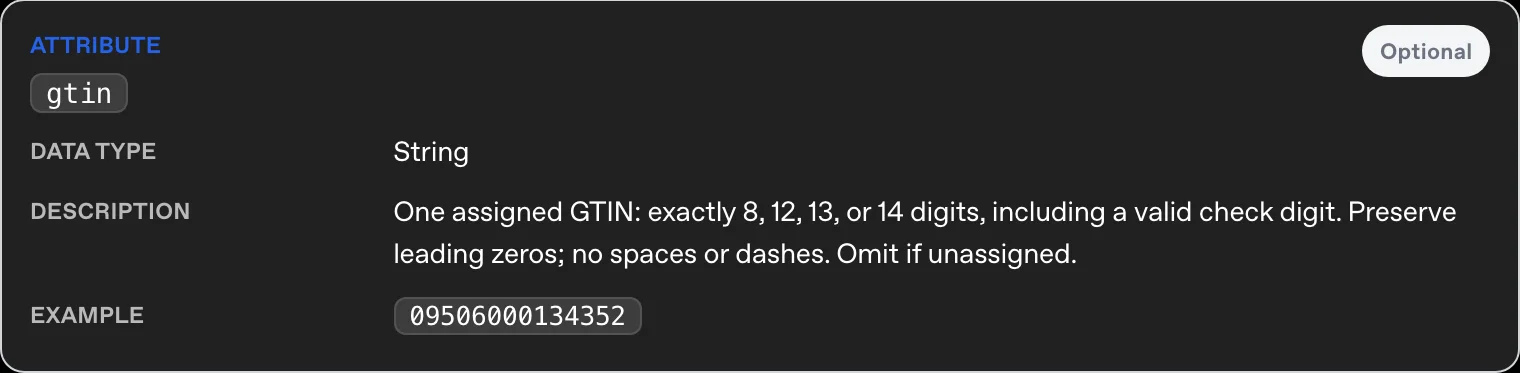
OpenAI hasn't said what it matches on. Its product feed spec does take a GTIN, insists on a valid check digit, and tells you to validate identifiers before you upload, because the upload won't catch every bad one10.
Your title is yours and your SKU is yours. The GTIN is the one value every shop selling the product shares2. Without it, a matcher has to guess from titles and photos, and that's a guess you can take off the table.
Clearing the list
- Download the affected products from the Needs attention tab in Merchant Center3.
- Put every GTIN in the feed through the checker, not just the flagged ones, and fix bad lengths and check digits where the data comes from.
- For the ones the checker flags for their prefix, swap in the manufacturer's GTIN, or leave the field empty.
- Look for one GTIN shared by several variants.
- For products with no GTIN, set
identifier_existstonoand fill inbrandandmpn.
Expect 24 to 72 hours before the issues clear from Needs attention4.
Catching bad GTINs before Google does
The fixes above clear today's list. The list comes back because new products keep arriving with the same faults: a supplier sheet that lost its zeros, a variant that inherited its parent's number.
FeedWorks checks GTIN length and check digit before your feed goes out, in the product inspector, and when Aurora checks products against a channel's spec. Merchant Center disapprovals for bad GTINs come back into FeedWorks within the hour.
You can also give Aurora a recurring task: every Monday, list the new products with a missing or invalid GTIN. FeedWorks counts the products missing a GTIN after each run and can email you when it finds something, and any fix Aurora wants is drafted for you to approve.
The count covers missing GTINs; invalid ones show up in Aurora's report and in the check before the feed goes out. The real number still has to come from the manufacturer, since nothing in a title can tell you a GTIN.