Fixing Google's mismatched price disapproval
Mismatched value (page crawl) [price] means Googlebot opened the link in your feed and found a different price on the page, or in its schema.org structured data, from the one you submitted. Most cases come down to a feed that updates less often than your prices do, or markup that disagrees with the page.
Last verified 21 November 2026. A seven minute read.
What Google found
Googlebot opened the link in your feed, read the price from the HTML your server returned and from the page's structured data, and got a different number from the one you submitted2.
The product stays disapproved until they agree.
In Merchant Center the issue reads Mismatched value (page crawl) [price], and if enough pile up you get an account-level warning, Inaccurate prices1. Google's help page for it is now titled Mismatched product price, and it warns that mismatches can end in a suspended account2.
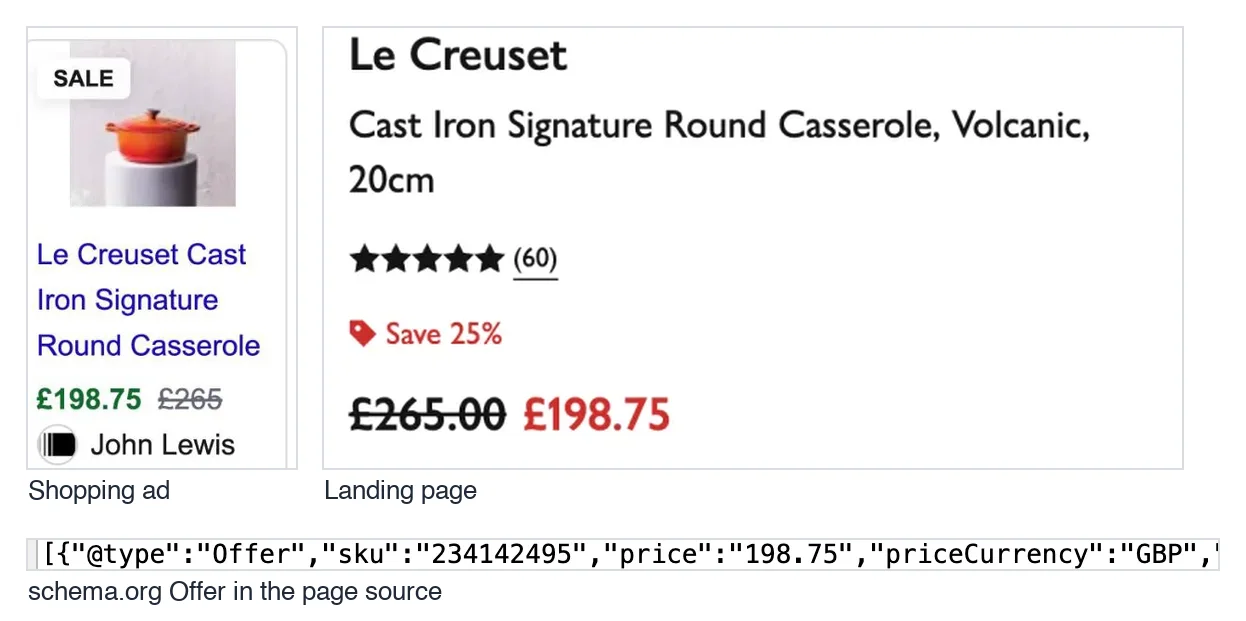
Three prices have to agree
For each variant you advertise, three things carry a price: the price and sale_price in your feed, the price on the landing page, and the page's schema.org markup16.
The John Lewis listing above is a clean example of all three lining up.
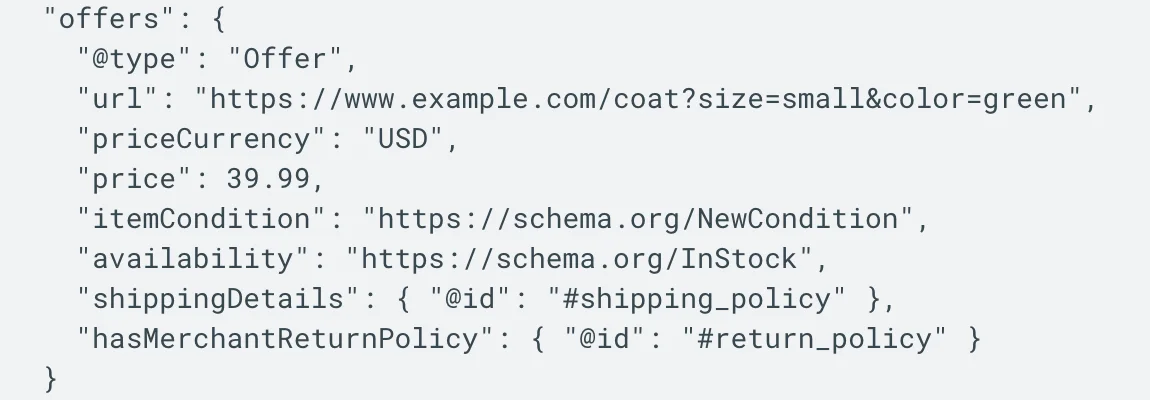
Google's help article Set up structured data for Merchant Center asks for a Product with a nested Offer on every landing page, preferably in JSON-LD, and each offer has to line up with your product data15.
Most stores check the page and never look at the markup.
A theme or plugin writes it, and it can quietly disagree with the page.
A variant problem we fixed
One fitness equipment retailer we work with had a run of Google disapprovals, every one for mismatched prices. Their product pages opened on the default variant whatever the feed's link said, so Google kept reading one price for a product sold at several. We changed what the feed sent, and every one of those disapprovals cleared within a month. The whole range could be advertised again.
The usual causes, most common first
Open one disapproved product in Merchant Center, copy its link, and open it in a private window. Then go down this table.
| Cause | Two-minute check | Fix |
|---|---|---|
| Feed older than the price | When was the feed last fetched, and when did the price change? | Sync more often, or send price from a faster source1 |
| Structured data disagrees | Does the Rich Results Test show the feed's price and currency? | Fix the markup for the variant on the page214 |
| Link opens the default variant | Is the feed row's colour and size the one selected, at the feed's price? | Link to the page with that variant selected3 |
| Tax counted differently | Does the feed include VAT where the page doesn't, or the reverse? | Follow the tax rule for the target country4 |
| Wrong currency | Is the feed currency the one the page shows most prominently? | Submit the target country's currency2 |
| Sale dates out of step | Do the sale dates and time zone match when the sale really runs? | Fix the dates and the offset2 |
| Price changes with location | Does the page show another price from another country? | Stop IP-based pricing, or use regional pricing4 |
1. The feed is older than the price
This is the one we see most. Your store changes a price at 9am, your feed tool fetched the catalogue at 2am, and Merchant Center holds the 2am price until the next run. Googlebot crawls in between, finds the new price on the page, and disapproves.
Google's own troubleshooter asks whether your last upload is more than 48 hours old1. That's the outer limit, not the target. If your prices move during the day, check how often your feed platform reads the store, how often it sends to Merchant Center, and whether a scheduled fetch in Merchant Center is pulling a file that's already stale. Your prices are only as fresh as the slowest of those.
Sales are where it bites. A sale that starts on the site at midnight and in the feed at the next morning's run is a night of mismatches.
2. The structured data says something else
Run the variant's link through the Rich Results Test and read the Offer block.
Its price and priceCurrency should match the feed row exactly214.
If the price on the page only appears once scripts have run, Google counts that as a mismatch too2.
3. The link opens the default variant
On Shopify, a product page picks its variant from ?variant= and the variant's ID, and without it you get the default8.
On WooCommerce, attribute parameters such as ?attribute_pa_size=large pick the variation10.
The link in your feed should open with the variant already chosen313.
It's the cause people look for last, because the feed looks right row by row.
4. Tax is counted differently
In the US and Canada the feed price leaves tax out. In the UK, the EU, Australia and most other markets it includes VAT or GST, and the page must show that same price4.
The trap is a page that changes its tax display once it knows who's looking. Shopify's dynamic tax-inclusive pricing may not show the right price on product pages until it recognises the shopper's location, unless you sell in local currencies through Shopify Payments9. A crawler is the least recognisable visitor you'll ever get.
5. The currency is wrong
Submit the price in the currency of the country you target, and if the page shows several, match the most prominent one2. Merchant Center's currency conversion is the alternative, and the converted price in the ad doesn't have to appear on your page417.
6. Sale dates are out of step
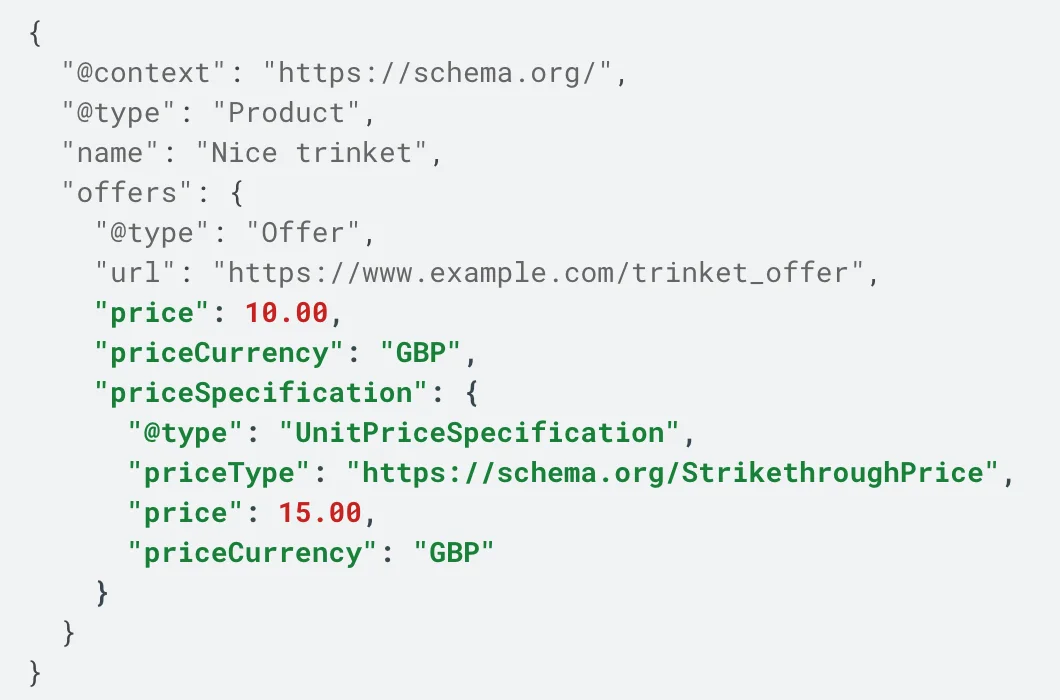
While a sale runs, the sale price is the current price, so a wrong start date or time zone in sale_price_effective_date puts the wrong one in your listing2.
End the sale in the feed at the minute it ends on the site.
7. The price changes with the visitor's location
Google's price rules say not to change the landing page price by the visitor's location, and call IP detection against its guidelines4. Googlebot's default IP addresses appear to be in the US7, so a UK store that shows US visitors dollars hands Googlebot a page its UK shoppers never see. Prices that really do differ by region belong in Google's regional availability and pricing418.
Automatic item updates: leave them on, don't lean on them
Automatic item updates patch the price in your ads from your page's structured data, and they're on by default5. Keep them. Your feed stays wrong, and Google still treats each mismatch as a critical error that can lead to suspension6. They may not work for prices that change more than once a day, and if your pages show more than one strikethrough price, turn price updates off5.
Fixing it on your platform
Shopify
The usual faults are links without ?variant= and a market set to dynamic tax display.
Send each variant's own link8, and check the market's tax display9.
WooCommerce
Variation links often lack their attribute parameters. Before version 11.0, a variable product's markup also carried the parent's price range on a variation's own URL; from 11.0 it gets a single Offer at the variation's price10. Link with the variation's attributes, update, and send prices on the basis set in Display prices in the shop11.
Magento
Configurable product pages often open with no option chosen, and a tax-inclusive price can appear only once a tax rule matches, after the shopper logs in or uses the cart's tax estimate12. Googlebot does neither. Link each child to a page that shows its price, and set Display Product Prices in Catalog to match your feed12.
Custom site
Nobody else wrote your templates, so the fix sits with your website developer, or whichever agent maintains the site. Ask them for three things: the variant selected from the URL, the price in the server's HTML, and JSON-LD that's rebuilt from the same price field the feed reads. Then ask how the feed is produced and how often, because a nightly export script is the usual culprit on custom builds.
If you already use a feed platform, look up its fetch and push schedule before anything else.
After the fix
- Fix the source, then re-fetch the feed so Merchant Center has the new prices or links.
- Put three of the affected links through the Rich Results Test.
- Request a website check. It can take up to 12 hours, and you can't send another request in that time2.
- Give it a few days. Googlebot re-crawls disapproved products over the next hours or days2.
When prices keep drifting
If your mismatches come back every week, the feed is running behind your store. FeedWorks imports from Shopify, WooCommerce, Magento or BigCommerce as often as hourly, and your own systems can push price changes in as they happen through its API. It sends to Merchant Center by API on the export's schedule, hourly at most, with only the products that changed.
It also merges sources. If your stock and price system updates faster than your catalogue, it can sit over the catalogue on its own hourly schedule while titles and attributes keep their daily one.