Product titles that work in Shopping ads and in AI answers
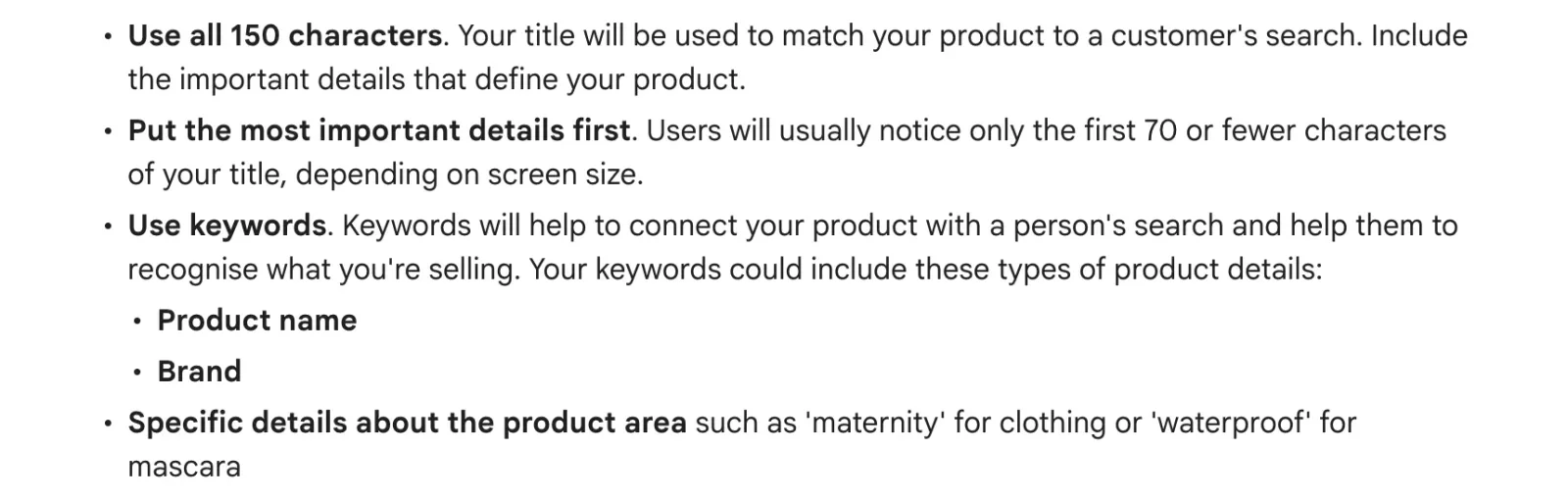
Google and Microsoft both allow 150 characters in a product title and say shoppers see 70 or fewer, and in today's Shopping grids it is often 25 to 50, so the front of the title wins the click and the rest tells the channel what the product is. Those extra words help match your product to more specific searches, and since you pay per click, not per character, they cost nothing to send.
Last verified 21 November 2026. An eight minute read.
70 characters shown, 150 allowed
Google's title spec allows 150 characters and says shoppers will usually notice only the first 70 or fewer, depending on screen size1. Microsoft is the same: the Microsoft Merchant Center product spec caps a title at 1502, and Microsoft's own Shopping ads guide says titles over 70 characters are cut off on the results page3.
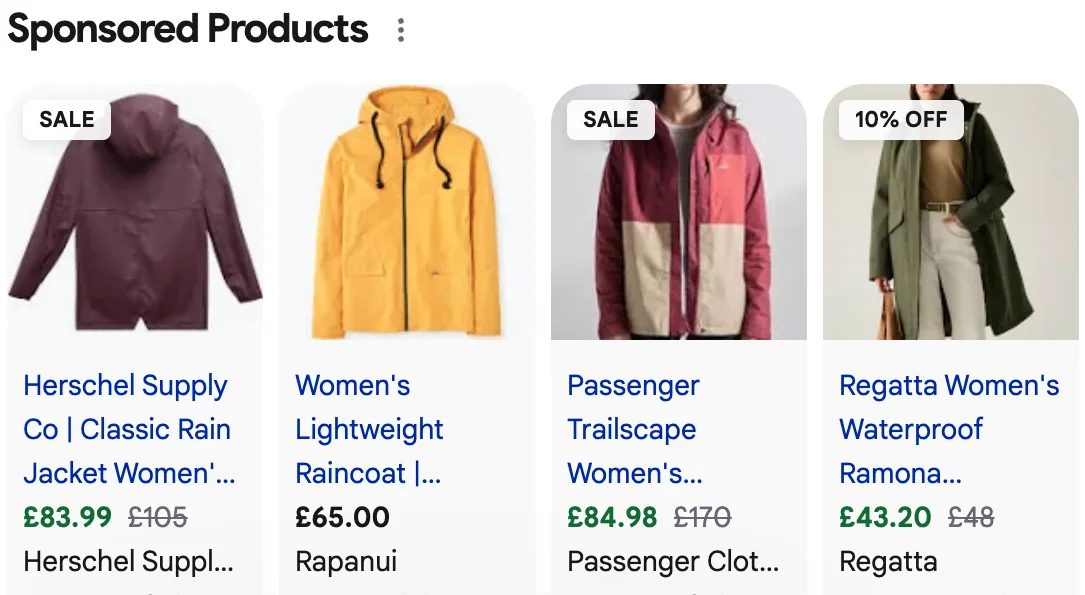
Google's 70 is a ceiling, and how much a shopper sees depends on where the product shows. This is what we saw on 21 November 2026, in the UK:
| Where the product shows | How much of the title a shopper sees |
|---|---|
| Sponsored products in the Shopping tab (above) | 28 to 47 characters, then an ellipsis |
| Shopping ads among Google Search results | About 25 characters, such as "Antler Cabin Suitcase In Sof..." |
| An offer inside Google's product panel, opened from Shopping or AI Mode | The whole title, 77 characters in one example |
| Google's own guidance | "The first 70 or fewer, depending on screen size"1 |
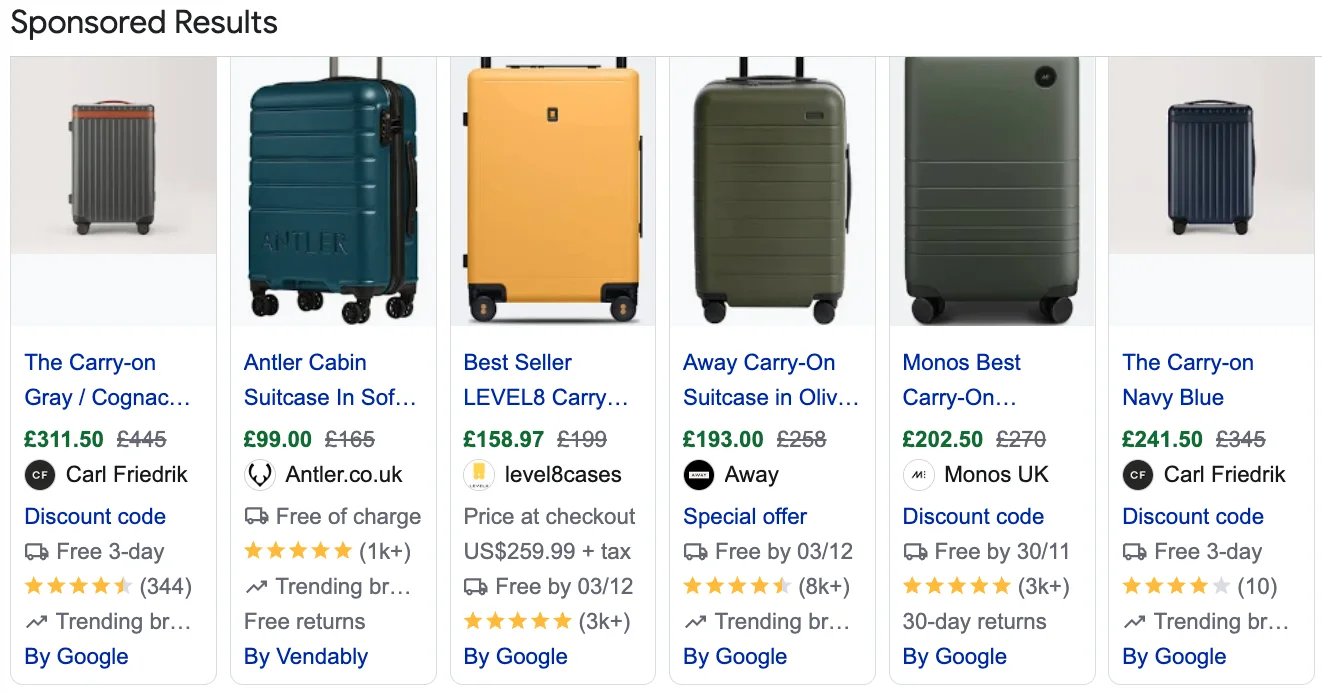
So most shoppers first meet your title as 25 to 50 characters. Behind "Regatta Women's Waterproof Ramona..." sits a 73-character title that goes on to the colour, the size and the fabric, Isotex. The shopper scrolling the grid never reads those words. Google does.
Why the 80 characters nobody reads still matter
Shopping ads don't run on keywords. Google says they use your Merchant Center product data to decide how and where to show, and that you're charged per click4. Its title spec says the title is used to match your product to a customer's search1. Microsoft says detailed titles give a product a better chance of appearing for relevant searches3.
So the title is the closest thing a Shopping campaign has to a keyword list, and everything past the cut, up to 150, is where the long, specific searches get matched.
| Part of the title | Who reads it | What it does |
|---|---|---|
| The front, 25 to 70 characters depending on where it shows | The shopper and the channel | Wins the click: brand, product type, the feature the picture can't show |
| The rest, up to 150 | Mostly the channel | Matches the specific search: fit, size range, fabric, use |
The person typing "petite insulated waterproof jacket size 16" is the one most likely to buy. They'll never read "petite" or "size 16" in your title, but those words are what let the channel connect the two.
None of this next part is published by Google or Microsoft; it's what we see running feeds. When the extra words match searches that convert, the product shows for more of them and tends to sit higher, because the channel is more confident it's what the shopper wants.
And you pay per click, not per character, so those words cost nothing to send. We haven't seen cost per click rise because a title got longer. Treat that as our experience, not a promise, and test it.
The limit on this is honesty. Google's tips page says not to use synonyms or search terms that aren't on the product's landing page5. Every word in those 80 characters has to be true of the product and said on its page.
What Google allows in a title
As of November 2026, the rules on Google's title page are short1. Describe the product the landing page sells. Name the variant, so a black size 12 doesn't read like the green size 8. No capitals for emphasis, no promotional text, no price, sale or delivery details, and no shop name. Break those and the product can be disapproved. Microsoft also rejects promotional text in a title2.
A title formula for each category
Google's own examples follow one pattern: what it is, then what makes this one different1. Its tips page adds a detail we use all the time: put key details at the front, especially if they aren't visible in the image5. The picture already shows the colour. It can't show that the jacket is waterproof.
| Category | Order | Example |
|---|---|---|
| Clothing | Brand, gender, product type, key feature, colour, size | Brackenfold Women's Waterproof Rain Jacket, Taped Seams, Olive, Size 12 |
| Shoes | Brand, model, gender, product type, key feature, colour, size | Northlane Trailfinder 3 Men's Trail Running Shoe, Waterproof, Black, UK 9 |
| Home and lighting | Brand, product type, key spec, material or finish | Kestrel Lane LED Desk Lamp, Dimmable, Adjustable Arm, Matt Black |
| Electronics | Brand, model, product type, key spec, colour | Corvane X2 Wireless Earbuds, Noise Cancelling, 30-Hour Battery, White |
| Beauty | Brand, product type, the property people search for, size | Halden Waterproof Mascara, Lengthening, Black, 8 ml |
| Bundles and multipacks | Main product, then what's included or how many | Brackenfold Merino Hiking Socks, 3 Pack, Grey, Size 6-8 |
The front of the title carries brand, type and the feature that wins the click. Everything after the colour is for matching. Drop the brand to the end, or leave it out, when nobody searches for it. Google only asks for it where it sets the product apart1.
Three titles, before and after
These are made-up products, written the way we usually find them in real feeds.
| Before | After | What changed |
|---|---|---|
| Trailfinder 3 | Northlane Trailfinder 3 Men's Trail Running Shoe, Waterproof, Black, UK 9 | A style name became a product someone can search for |
| STORM JACKET - BEST SELLER - FREE DELIVERY | Brackenfold Women's Waterproof Rain Jacket, Taped Seams, Olive, Size 12 | Capitals and promotional text out, both against Google's rules |
| Desk Lamp | Office Lamp | Reading Light | LED Lamp | Kestrel Lane LED Desk Lamp, Dimmable, Adjustable Arm, Matt Black | One clear product type instead of four guesses |
The first row is the one we see most. A shop names its products the way its own team talks about them, and "Trailfinder 3" means nothing to a stranger typing "waterproof trail shoes". For one apparel retailer, titles that were only style names were rebuilt into full titles with brand, product type, gender, colour, size and material, so each product could match the way people actually search and ask.
The third row is the synonym trap from Google's tips page5. Four guesses at a product type is keyword stuffing, and the extra characters are better spent on facts.
What your store sends by default
If you're on Shopify, the Google & YouTube app gets products into Merchant Center in a few clicks, and it works. Google's help says it sends either your main product title or your SEO title, whichever the app's settings pick6.
Both were written for your own site, so the title Google gets is the one every other store on the platform sends: no product type ahead of a style name, no size, nothing written for the 80 characters past the cut. Getting the title right for the channel means changing it somewhere between your store and Google, without touching the product page.
Google may rewrite your title anyway
Google can change the title it shows, using your landing page, images and other signals to fit a shopper's search1. If your title is already the best fit, it says nothing changes1.
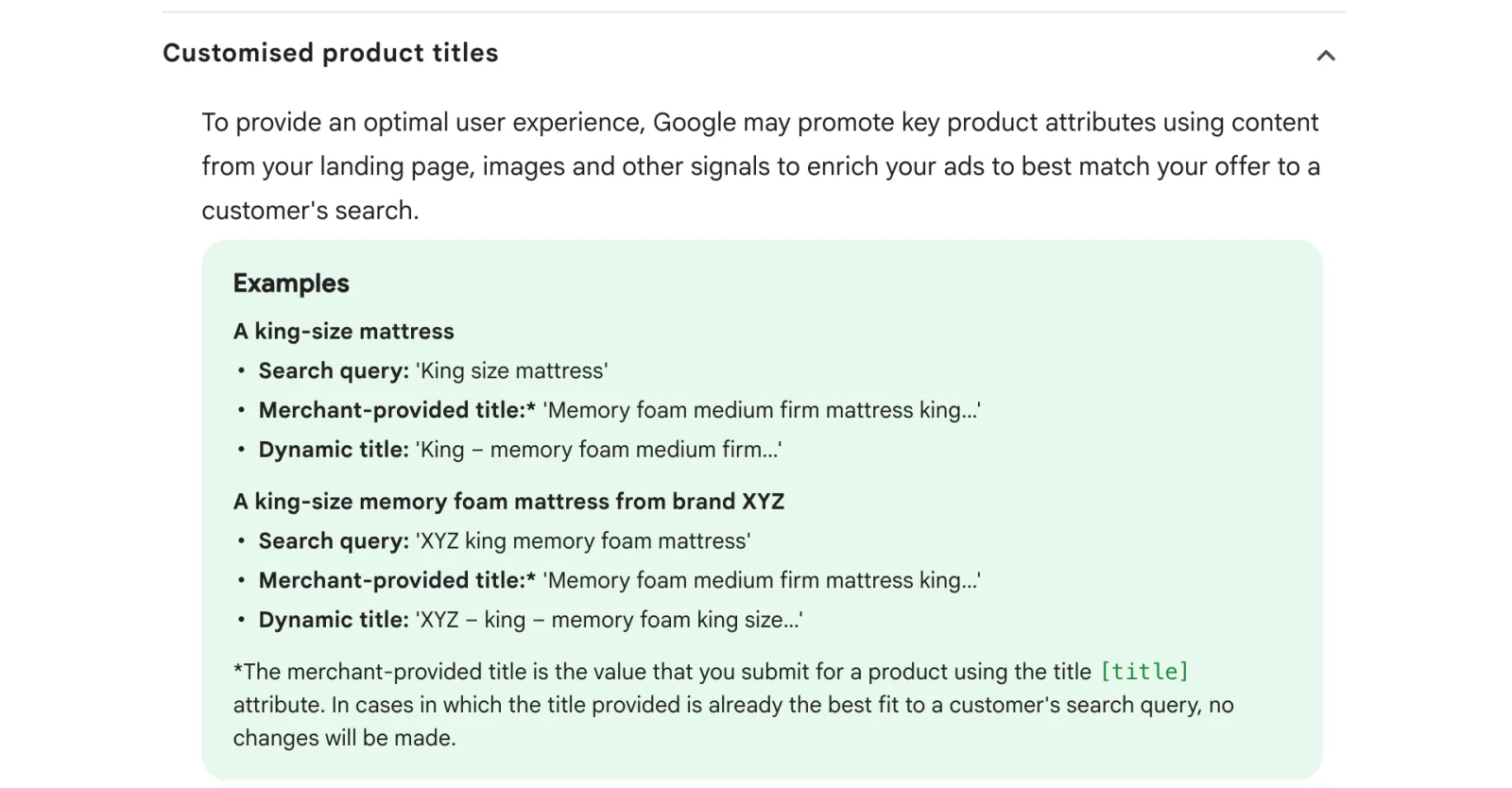
Read that as a hint. Google's own example pulls the size and the brand forward, which is the order the formula above already uses. You can opt out through your account manager or Google support, which Google says typically takes three to five working days1. We wouldn't, unless you're testing titles and need the results to reflect yours.
Titles that AI assistants read
An assistant gets a question, like "a waterproof trail shoe with a wide fit for flat feet", and answers in sentences. When we checked on 21 November 2026, neither Google nor OpenAI had published how an assistant weighs your title against the rest of your data. What the specs do show is that both ask for the same thing: the product's name, with its variant.
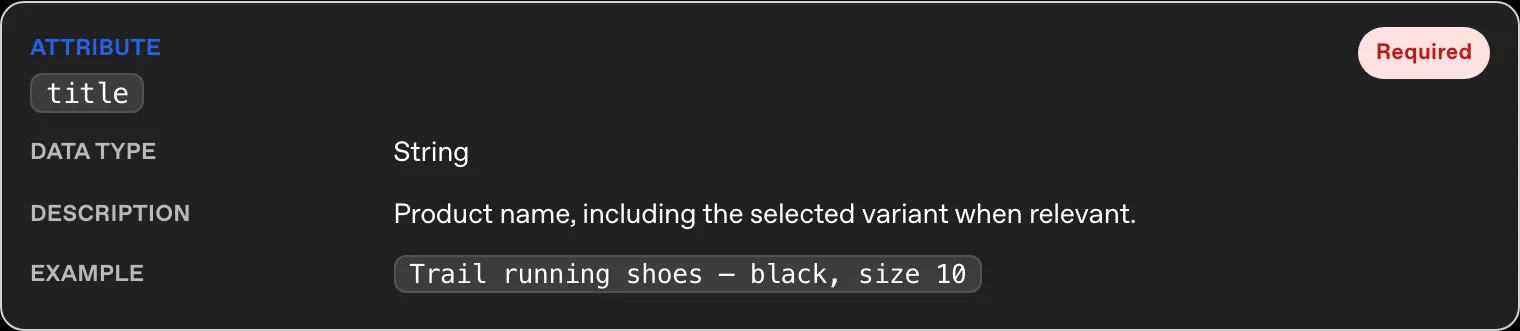
The OpenAI product feed spec wants the product name with the selected variant, at most 150 characters7. It says nothing about capitals or promotional text, so write to Google's stricter rules and use one title for both. An assistant isn't fitting your title under a picture, so we'd expect the characters past the cut to matter more here.
Products sold in variants also need one shared name.
Google's item_group_title holds it, up to 150 characters, shorter and more generic than each variant's title8.
Our conversational attributes guide covers it with the rest of that set.
If software wrote the title, Google wants to know.
Titles created with generative AI go in structured_title, marked as AI-generated, and if you send both, Google uses title1.
Test a title change before you roll it out
A new title formula changes which searches a product appears for, so it can lose traffic as easily as win it. Don't change every title on Monday and compare fortnights. Put the new title on half of a set of matched products, keep the old one on the other half, and compare them over the same weeks.
The order we'd test, one change at a time:
- Product type in place of a style name, where titles have none.
- The detail the picture can't show, such as waterproof or dimmable, moved into the first 40 characters, where the grid still shows it.
- Characters 71 to 150 filled with true details that match your converting search terms.
- Brand first against product type first, for brands people don't search by name.
Our rule is at least 2 whole weeks per test, the first few days left out while Google reprocesses the feed, and a decision at 95% confidence. The method is in product feed A/B testing.
When you have thousands of titles to rewrite
Rewriting titles by hand stops working at a few hundred products, and the store's own titles are written for the product page. In FeedWorks a title formula is a single rule. Type it the way you'd say it, "rebuild my Google titles as brand, gender, product type, material, colour and size", and Aurora turns it into a condition and a template you can read and change.
Only the feed changes; your product pages stay as they are. Start a title test from the same rule: the products it touches are split into matched groups, one keeps the old title, and the result is measured on Google. If it wins, it stays as a rule, so next season's shoes get the same title shape. More on the A/B tests page.