How to switch feed platforms without losing a product's history
Switching feed platforms goes wrong in four places: product IDs that change and wipe their history, a field the new tool maps differently, disapprovals on day one, and supplemental feeds nobody moved. Keep every ID, compare the new feed with what Google holds field by field, rebuild the supplementals, and switch with the old feed paused, not deleted.
Last verified 21 November 2026. A six minute read.
What actually goes wrong in a switch
You're unhappy with your feed provider, and the new one promises the move is easy. We've been moving live feeds between platforms for more than a decade, and the damage nearly always comes from one of four things:
- Product IDs change. The new tool builds the ID a little differently, and on switch day Google sees thousands of products it has never met, with no history.
- A field is mapped differently.
linknow opens the default variant,sale_pricecomes from another column,custom_label_2holds something new. No error, just a different feed. - Disapprovals on day one. Prices that don't match the page, GTINs the old tool quietly dropped, categories Google rejects.
- Supplemental feeds are forgotten. The Google Sheet that fixed 400 titles stays attached to the old source, and the fixes vanish with it.
Google is plain about the first one. The ID, with country and language, is how Merchant Center and Google Ads track a product's history, and if it changes, the product and its history are overwritten1.

The feed platforms people switch between
Everything here applies whichever tool you're leaving or joining. Common ones include Feedonomics, DataFeedWatch, Productsup, Channable, GoDataFeed, Shoppingfeed, Lengow, Rithum, Athos Commerce, Mergado, Feedoptimise, Producthero and ChannelEngine.
The same goes for leaving a store's own connector, such as Shopify's Google & YouTube app. It syncs the store as it sits to the countries and languages you pick4, with IDs in its own format, and that format is what the next tool has to keep.
Keep every product ID, exactly
Write down the IDs Google holds today before your first call with anyone, and make matching them a condition of the move.
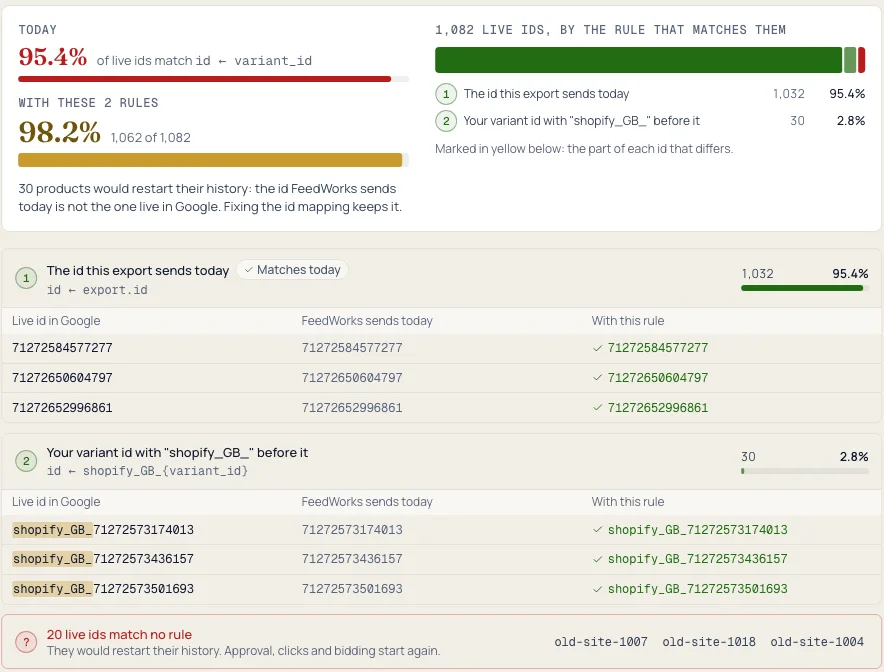
The drift we see most is a market prefix: one store's IDs all start shopify_GB_, and the new tool sends the bare number.
This is where IDs drift:
| What changed | Example | What Google sees |
|---|---|---|
| Parent ID instead of variant ID | 1042 for every size, not 1042-M |
Variants sharing one ID1 |
| A prefix added or dropped | shopify_GB_1042 becomes 1042 |
A new product |
| Casing | ABC123 becomes abc123 |
Duplicates, and serving history lost3 |
| Leading zeros dropped by a spreadsheet | 00731 becomes 731 |
A new product |
| SKU instead of the platform's ID | TEE-NVY-M replaces 1042-M |
A new product |
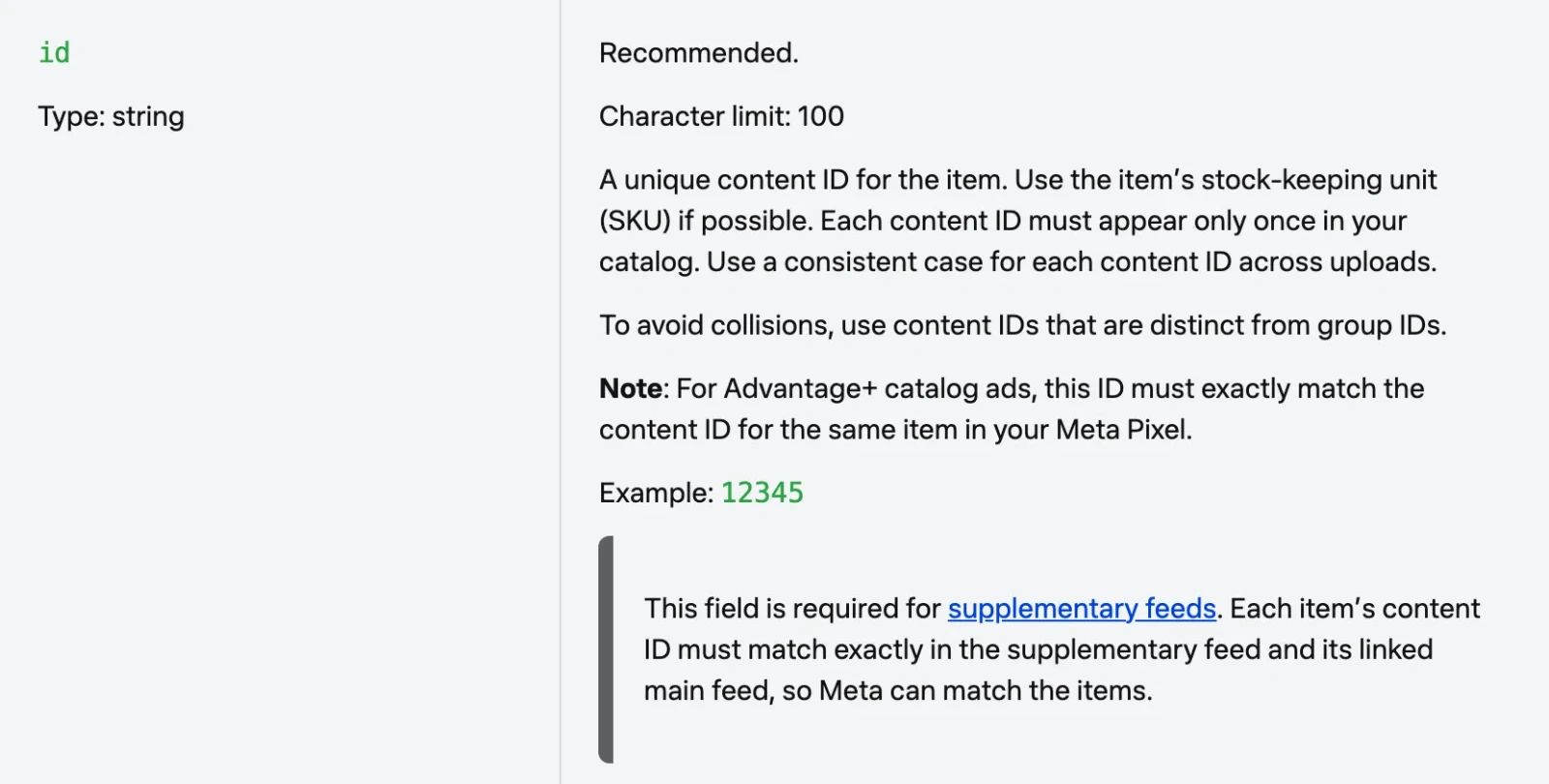
Meta is stricter still. Its catalogue field reference asks for one content ID per item that matches exactly what your pixel sends59, so a changed ID breaks retargeting as well as history.
Don't test in the live account
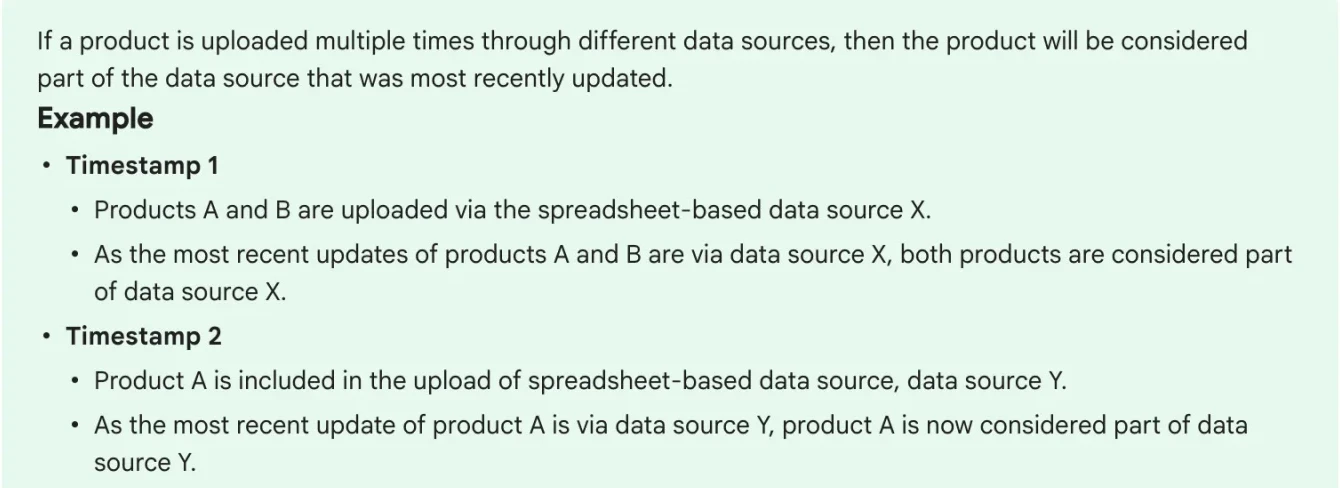
Build the new feed while the old one keeps running. Don't add it to the live Merchant Center account as a second source to "try it": a product sent by two sources belongs to whichever updated last2, so the test takes products over and the old tool's next run takes them back.
Google's own migration guide says to rehearse in a test account3. A supplemental source won't do as a test either, since it can't add products6. Give the comparison a week of daily runs, so it sees a price change, a sale start and a size sell out.
Compare field by field against what Google holds
Compare the new feed with what Merchant Center holds today, not with the old tool's settings. Years of rules, supplementals and manual fixes sit between the two. Line them up by ID: every difference is either a change you meant or a bug.
| Field | Check |
|---|---|
id |
Same set, same case, none missing, none new |
price, sale_price |
Same amount and currency on every variant |
link |
Opens the page with that variant selected |
gtin, brand, mpn |
Unchanged |
item_group_id |
Same grouping |
custom_label_0 to 4 |
Same values, so campaign filters still match7 |
title, description |
Changed only where you rewrote them on purpose |
Custom labels deserve the extra minute. They drive the product filters in Shopping and Performance Max campaigns7, so a label filled differently empties an ad group without a single error. Leave titles alone during the switch, even weak ones: change one thing at a time, and you'll know what moved your clicks.
Bring the supplemental feeds with you
List every supplemental source in Merchant Center and what it changes. We've seen a Sheet nobody remembered owning hold the only good titles for a whole category. Each one is attached to the primary sources it updates through data source rules2, so it doesn't follow a new primary on its own. Rebuild each fix in the new platform, as a rule or a live join to the same Sheet, before the old source stops.
The switch, step by step
- Freeze rule changes in the old tool.
- Add the new feed as a primary source with the same countries and language as the old one1.
- Let it fetch before you touch the old one. Google says to upload the new source before removing the old, so IDs and history carry over2.
- Check the new source holds every product and the old source's count has fallen to zero3.
- Pause the old schedule and keep the source for a month. A stray refresh would take products back2, which is what you want only on the day you roll back.
- On Meta, send the new feed to the same catalogue with the same content IDs, and keep the old feed paused, not deleted. A replace schedule deletes items missing from its file8.
- Watch for two weeks: product count, disapprovals, and clicks per product.

Rolling back is the same in reverse. Because the IDs never changed, each product keeps its history whichever way it moves.
Switching with a team that has done it for more than ten years
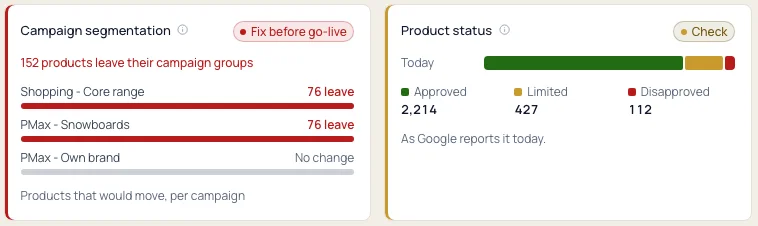
A first switch is a checklist from a guide like this one. After more than a decade of moving live feeds between platforms, the list is longer, and FeedWorks has built most of it into the product as the Go-Live Checklist on the export page. It compares your new feed with what Merchant Center holds today, before anything is sent, and sorts every finding into fix before go-live, check, looks intended or done.
| What a first switch tends to miss | What the Go-Live Checklist does |
|---|---|
| The ID rule, not just the ID list | Finds the rule that matches the IDs live in Google, such as a shopify_GB_ prefix, and names the ones no rule matches |
| What Google holds, as against what the old tool says it sends | Compares every product field by field against Merchant Center |
| A price that moved since Google last fetched, mistaken for a broken mapping | Says why each difference exists: a shopper price change, older data in Google, or a real difference |
| Values already wrong in Google today | Marks them as already wrong, so the new feed isn't blamed for them |
| Products falling out of their campaigns | Shows how many products would leave each campaign group |
| Day-one disapprovals with no baseline | Records approved, limited and disapproved counts before the switch |
| Supplemental feeds | Lists the ones Google applies today and rebuilds each as a mapping, a rule or a live join to the same Sheet |
| Shipping and US tax | Checks both against what Google holds |
Fixes are tried on your data before they're applied, and anything that needs judgement goes to Aurora, with a person deciding.
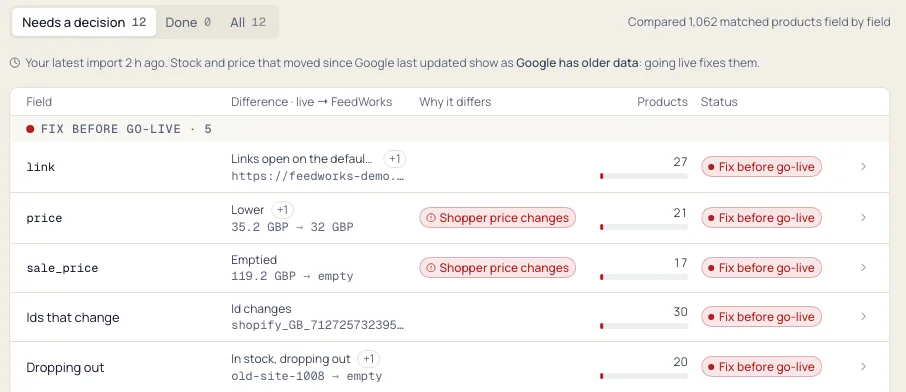
The switch itself is where experience counts most, so the FeedWorks team runs it with you. Going live saves a copy of every Google data source first, then adds the FeedWorks feed, turns off the old sync, updates campaign filters and watches the first 72 hours, with that copy to switch back to.
As of November 2026 the checklist covers Google only, so on Meta, check the content IDs against your pixel with the steps above before the switch.