Getting your products into Microsoft Copilot shopping
Copilot gets its products from a Microsoft Merchant Center feed, which Microsoft can import from your Google feed on a schedule, or from Shopify or Stripe. As of November 2026 Copilot Checkout, buying inside the chat, is open to English-language merchants selling to US buyers in US dollars, and Microsoft marks the store settings that switch it on as a pilot for select customers.
Last verified 21 November 2026. A six minute read.
What Copilot shows a shopper
Ask Copilot for a cheap, light laptop for college and it answers with a row of product cards. Each card has a title, a star rating, a line about the options, the seller and the price.
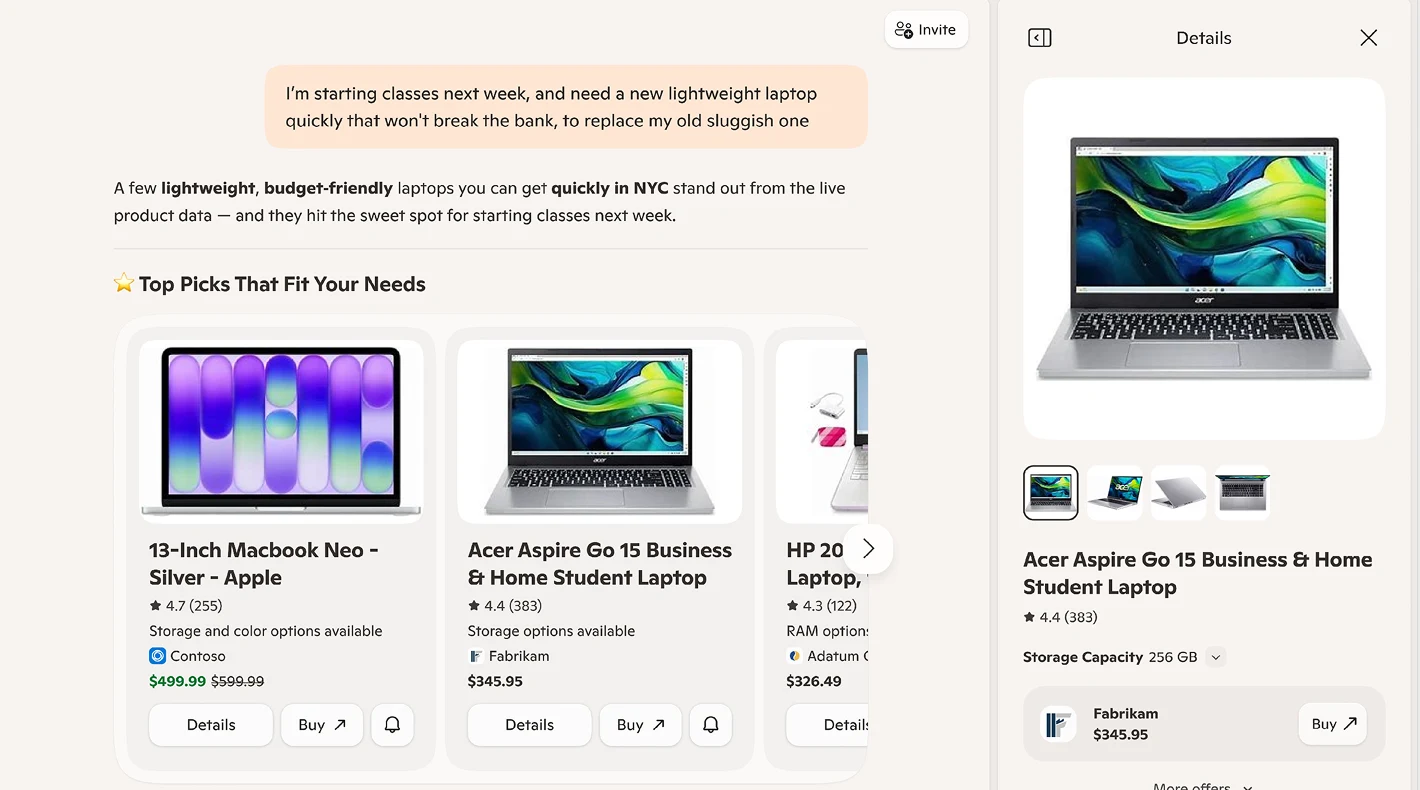
Microsoft's help page for shoppers says the details Copilot shows depend on what the merchant provides11. Its agentic commerce page says feeds mainly enable discovery, and the Universal Commerce Protocol (UCP), an open standard for agents to run a checkout with a merchant, handles the sale1. That feed lives in Microsoft Merchant Center, Microsoft's own, not Google's.
So start with the feed. If you don't sell to US buyers, the checkout half doesn't apply to you yet.
Which route is yours
| You sell through | Route in | What it gets you | Source |
|---|---|---|---|
| Shopify | Shopify Catalog, through agentic storefronts, on by default for eligible stores | Listed, with your store data as it sits | 16 |
| Stripe | A CSV catalogue in Stripe's Agentic Commerce Suite, then a connection request per agent | Listed, with whatever the CSV holds | 17 |
| Any other platform | A Microsoft Merchant Center store and a UCP-ready feed | Whatever you put in the feed | 1 |
The one-click routes work. Turn one on and your products can reach Copilot without a feed file of your own. What they can't do is make you stand out, because they send your catalogue exactly as it sits, the same as every other Shopify or Stripe merchant switching on the same toggle.
Copilot's card shows a title, a line about options, a rating and a price. If your title is a style name and your fabric, fit and age range are written in the description or kept in tags and collections, the card has nothing to say and a specific question has nothing to match.
Lifting those facts into their own fields, and writing titles for this channel, is work no connector does.
Every route into every assistant is in how products get into AI assistants.
Setting up Microsoft Merchant Center when you already run Google Merchant Center
You create the store inside Microsoft Advertising and prove you own the domain through Bing Webmaster Tools or a Universal Event Tracking (UET) tag8. A UET tag has to record at least 50 events before the domain shows up as an option8. Microsoft reviews the store, which can take up to five days, and turns down sites without a real privacy policy or with an unencrypted checkout8. Start this first.
Then use Microsoft's Google import rather than building a second feed. It runs daily, weekly or monthly, pulls every offer including pending and disapproved ones, and skips products sold only in store9. If the store domain differs between the two Merchant Centers, the import fails9.
Most Google attributes come across untouched. These are the ones that behave differently10:
| Google attribute | What Microsoft does with it |
|---|---|
product_type |
Treats the whole comma-separated path as one value, so auto-targets have to match the full string |
price |
Must include VAT in the UK, France, Germany and Australia |
tax, shipping |
Ignored, except shipping is required for Austria and Germany5 (the import page says Germany only) |
structured_title, structured_description |
Used only when your own title or description is empty |
Per Microsoft's product attributes reference, a new or changed title, description or image goes back to pending review, which can take up to 3 business days5. Don't rewrite every title the week before a sale.
What makes a feed UCP-ready
Microsoft's merchant page names four things1. Support for UCP-ready feeds became generally available in the US on 21 April 20264.
| What Microsoft asks for | Where it lives | What to do |
|---|---|---|
| Returns and support | Store settings, then UCP settings | Add a return policy URL, return window and any restocking fee, and at least a customer service URL2 |
| Product warnings | Feed, only for products with a legal disclosure duty, such as Proposition 65 items | consumer_message_type and consumer_message_content5 |
| Merchant Item ID | Feed | Your id, which Microsoft says is the merchant product ID. Unique per market, 50 characters at most5 |
| Native checkout eligibility | Not documented | No feed attribute named yet (see below) |
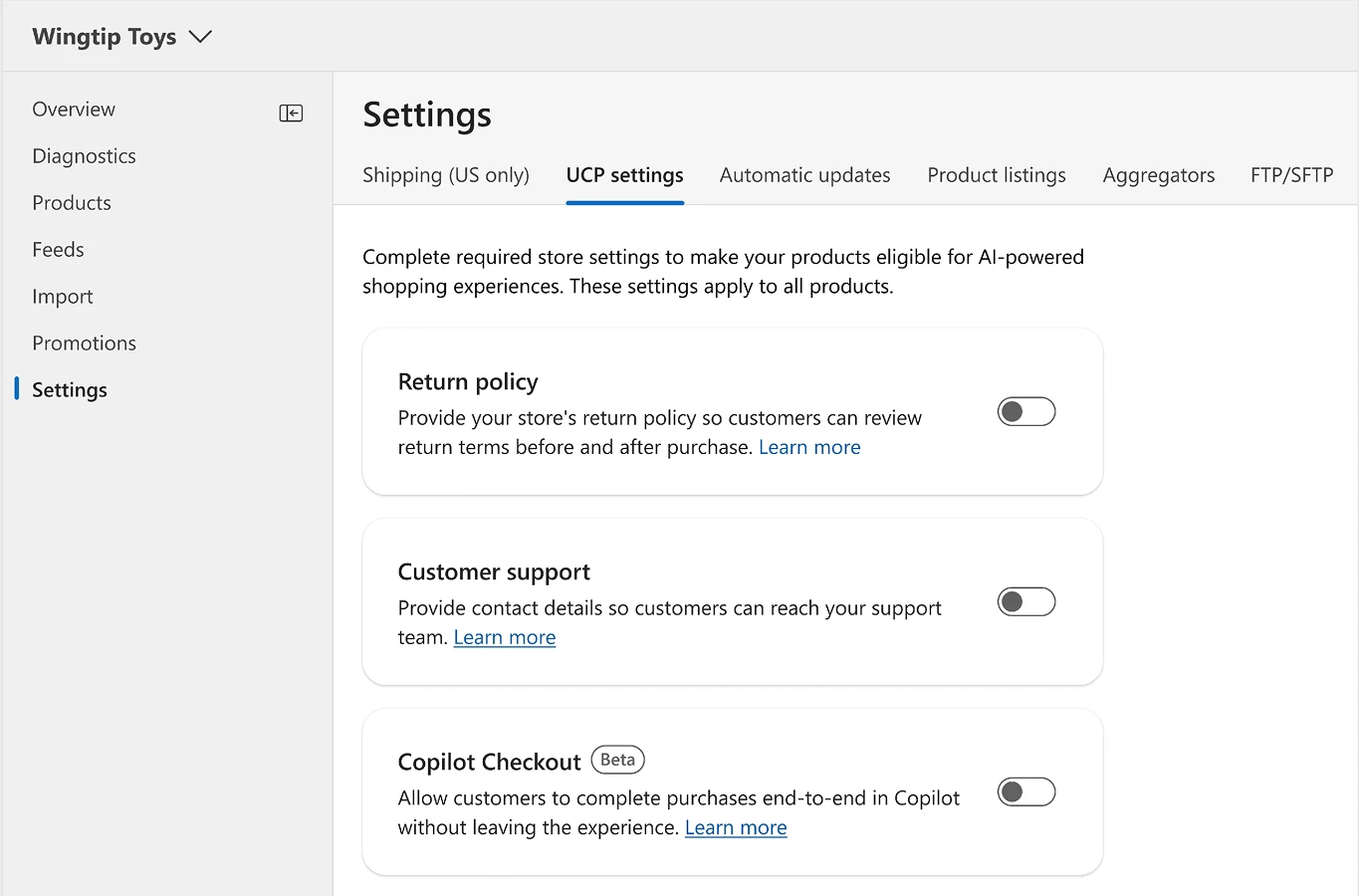
Microsoft's two help pages name the warning fields differently.
The UCP readiness article, opened again on 21 November 2026, says consumer_notice_type and consumer_notice_message, and writes the returns label as both return_policy_label and return_policy_labels2.
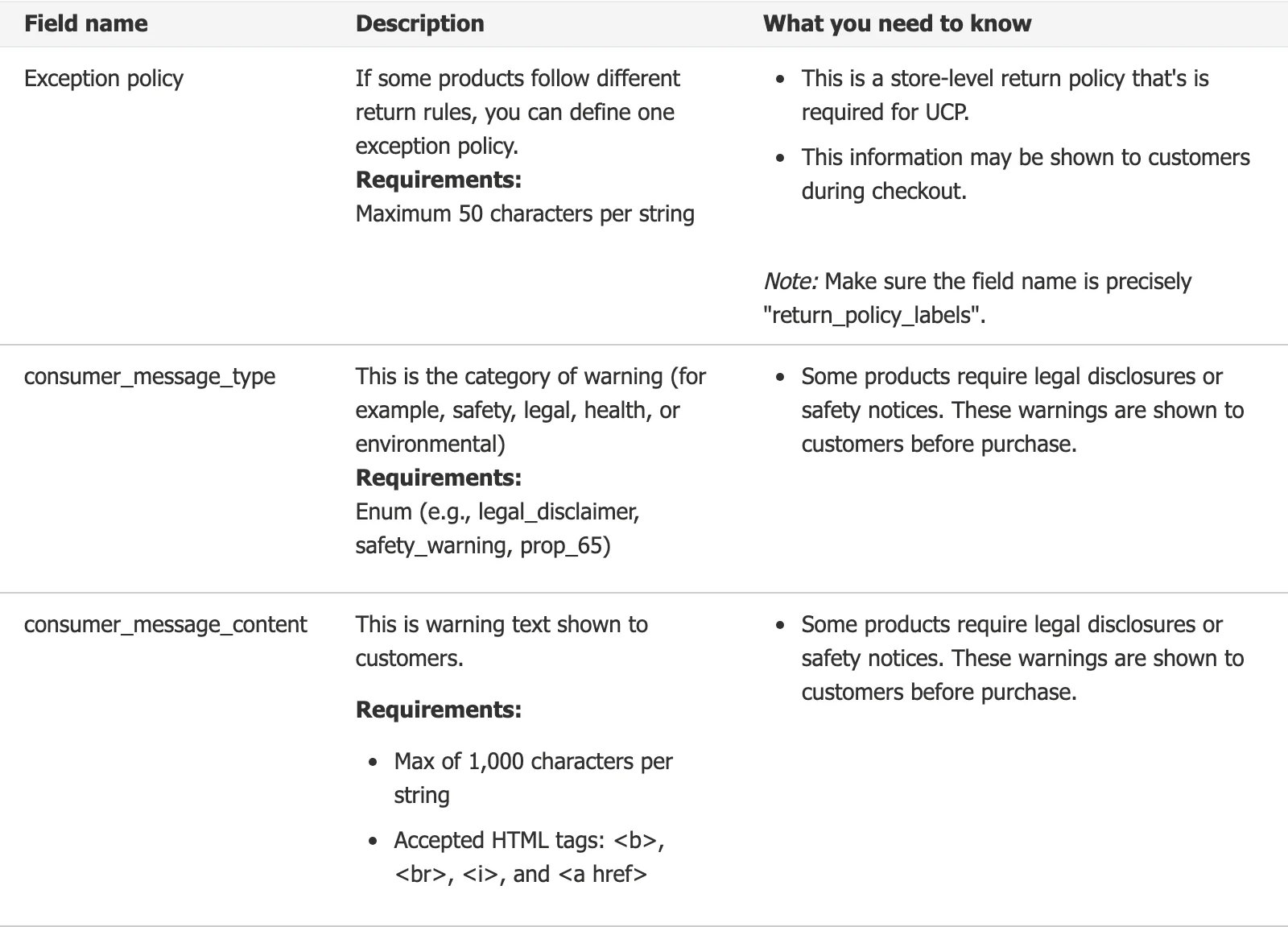
We'd follow the attributes reference, because it's the feed spec5. Then check what Merchant Center reports after the next upload. On the missing checkout attribute, don't paste Google's across and hope Microsoft reads it.
Who can use Copilot Checkout
Copilot's default is to send a shopper to your site. Microsoft's shopper help says Buy goes to the retailer's purchase page11.
Copilot Checkout keeps the purchase inside the chat. You stay the merchant of record, and payments, fraud, tax and fulfilment stay on your own systems1.
As of 21 November 2026, Microsoft's merchant page says it is open to English-language merchants selling to US buyers in US dollars, and that it can't give a timeline for other markets1. It runs on Copilot.com and the Copilot mobile app, the store settings that turn it on are a pilot for select customers, and each merchant gets one payment provider1.
At launch in January, Microsoft named PayPal, Shopify and Stripe as partners and said Merchant Center wasn't needed to sell through checkout3. Today it names Shopify and Stripe, and asks for a Merchant Center account and a UCP-compliant feed1. PayPal merchants should ask PayPal where they stand.
January also promised Bing, MSN and Edge3. They're not on the current page.
Outside the US
Microsoft Merchant Center runs in dozens of markets, from the UK and Canada to Germany and Australia9. A clean feed there serves Microsoft Shopping campaigns now, and Microsoft says Merchant Center feeds help inform Copilot's organic results3.
We found three gaps in Microsoft's docs on 21 November 2026: no feed attribute for native checkout eligibility, no statement on PayPal as a checkout partner, and no list of the countries where feed products appear in Copilot answers. We won't guess at any of them. For every programme by market, see AI shopping by country.
What to do first
- Create a Microsoft Merchant Center store and verify the domain today, because review takes days.
- Set up the Google import on a daily schedule, then read what it skipped.
- Fix
product_typeso you can target it, and put VAT into prices for the markets that need it. - Publish a returns page and a support page, then switch both on under UCP settings.
- Make sure every
idstays the same for the same variant from one import to the next.
If you're on Shopify or Stripe and skip the steps above, you skip the control that comes with them too. The rest of the checklist is in agentic commerce readiness.
When your Copilot cards say too little
Most catalogues we open have the facts Copilot's card needs, just not in fields. FeedWorks pulls colour, material, pattern, gender and product type out of your titles, descriptions and tags into the fields each channel reads, as rules that keep working on every product you import.
It scores each product against each channel's required and recommended fields, so the gaps show up as counts, and it builds the Microsoft feed from the same catalogue as your Google one, hosted at a URL or delivered by SFTP for Microsoft Merchant Center to fetch.
Titles are usually the first fix. A title that's only a style name gets rebuilt into brand, product type, gender, colour, size and material, so each card names what the product is. Aurora drafts a change like that from a sentence and shows it on the whole catalogue; by default a person approves it before it's applied.
Microsoft still decides what shows in Copilot, and checkout, the UCP switches and the payment provider stay between you, your platform and Microsoft.