The Meta catalogue product feed spec
Meta requires id, title, description, availability, condition, price, link, image_link and brand on every product, and size for clothing and shoes sold in Shops. It reads a Google-style feed, but with longer limits, spaces instead of underscores, and an ID that has to match your pixel.
Last verified 21 November 2026. A five minute read.
A catalogue ad is your feed, rendered
This is an H&M HOME ad running on Facebook and Instagram in the UK, found through Meta's public Ad Library7.
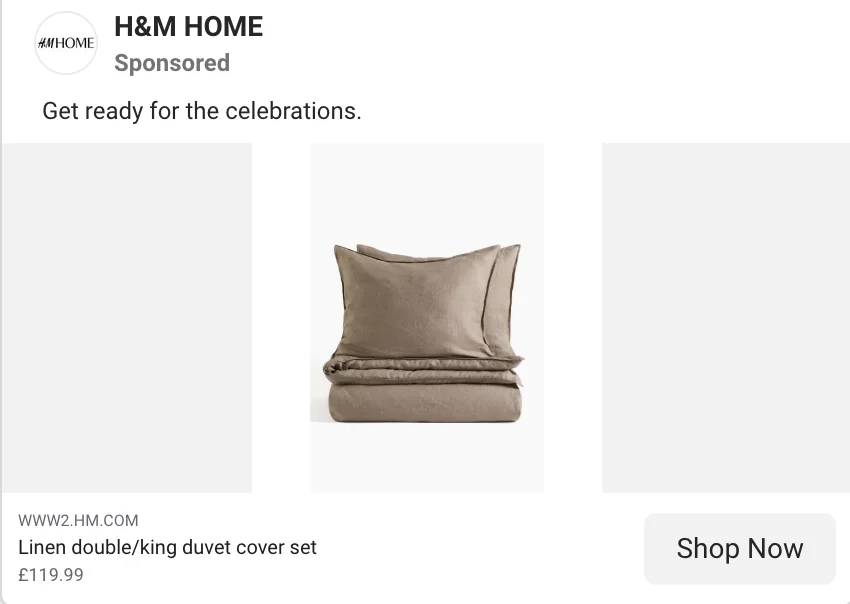
The ad swaps its product on every load: a duvet cover set, then a fitted sheet. That's how a catalogue ad behaves: the name, price and domain under the picture change with the product, row by row. Meta asks for detailed product data, and most catalogues send the minimum.
The spec is Meta's product data specifications for catalogues in Commerce Manager1, read on 21 November 2026. The developer version, catalogue fields2, labels the same fields "recommended" and says requirements depend on how you use the catalogue. We go by the help page, which is stricter.
Where Meta parts from Google
Most Meta catalogues start life as a Google feed or a store sync, so start with what changes.
Meta even accepts google_product_category.
- Availability uses spaces:
in stock. Google'sin_stockisn't one of Meta's values. - Brand and condition are required on every product. Google needs brand only for new products and condition only for used or refurbished.
- A GTIN is optional on Meta. Google requires one where the maker assigned it.
- IDs can be 100 characters, twice Google's 50. Keep them under 50 and one ID works on both.
- Titles can be 200 characters, against Google's 150, but Meta wants the point made in 65.
- Variant group IDs must not match any product ID in the catalogue1.
A store sync skips this translation step but not the gaps. Shopify's Facebook and Instagram by Meta channel syncs products to a Meta catalogue4, in the shape the store holds them, the same as every other Shopify store sending through it. A title that's just a style name arrives as a style name, and the material is still in the description.
The 9 fields on every row
| Field | Status | Limit or rule |
|---|---|---|
id |
Required | 100 characters, case-sensitive, must match the content ID your pixel sends |
title |
Required | 200 characters, under 65 recommended |
description |
Required | 9,999 characters, plain text, no links |
availability |
Required | in stock or out of stock, with spaces |
condition |
Required | new, refurbished or used |
price |
Required | 9.99 USD form, one currency per file |
link |
Required | Your own domain, if you sell through Shops |
image_link |
Required | JPEG or PNG, at least 500 by 500 pixels, under 8 MB |
brand |
Required | 100 characters |
size |
Depends: clothing and shoes in Shops | 200 characters |
The pixel rule is the one that hurts later.
Meta says the id must exactly match the content ID your Meta pixel sends for the same product before you can run ads with product media1.
A Shopify variant ID in the catalogue and a SKU in the pixel look fine in both places and match nothing.

Optional fields that pull their weight
Meta's help page lists more than 20 optional fields1. These are the ones we'd fill:
| Field | Limit | What it does |
|---|---|---|
item_group_id |
Must differ from every id |
Ties variants together |
additional_image_link |
Up to 20 | More images for carousel and collection ads |
video[0].url to video[19].url |
20 videos, 200 MB each | Product video in catalogue ads |
color, material |
200 characters each | Filters and product sets |
gender, age_group |
Set values | Who the product is for |
google_product_category or fb_product_category |
One category | Unlocks the category-specific fields |
gtin |
8 to 14 digits | Helps Meta classify the product |
rich_text_description |
9,999 characters | Formatted text in Shops, not in ads |
shipping |
Country:Region:Service:Price |
A price of 0 enables the free delivery overlay |
internal_label |
110 characters per label | Product sets without a policy review |
Meta now recommends internal_label over custom_label_0 to 4 for building product sets, because changing an internal label doesn't send the product back through policy review1.
Getting the file to Meta
Meta takes CSV, TSV, Excel, Google Sheets or XML1.
A one-off upload can be 100 MB, a scheduled feed 4 GB, and Meta recommends no more than about a million items per feed1.
A scheduled feed is fetched from an http, https, ftp or sftp address1, and no more often than once an hour3.
For anything faster, Meta points you to its Direct Upload API3.
Meta only fetches an image again when its URL changes, so a new photo saved over the old file stays unseen1. Each file holds one currency; other currencies go in separate country feeds1.
What Meta AI and Muse read
Meta hasn't published a feed spec for Muse, its AI shopping agent, as of 21 November 20266. What Meta documents is the catalogue: Advantage+ catalogue ads use it to match products to people5. Our Muse guide covers how products reach Muse.
The catalogue is the structured product data Meta holds about you either way. A colour, a material and a proper title are what lets a question like "linen shirt for a summer wedding" find the shirt.
If your Meta catalogue is a copy of your Google feed
Most are, and the gaps show: underscores in availability, a blank brand on half the range, a style name for a title.
FeedWorks builds the Meta catalogue from the same product data as your Google feed and pushes it to Meta by API, sending only what changed. Availability is written in Meta's spelling on the way out. The attributes sitting in your descriptions and tags become fields, through rules Aurora drafts for you to approve.